


Synchronous vs. Asynchronous Replication: How SafeKit Ensures Zero Data Loss?
Choosing the Right Replication for High Availability (HA) and Disaster Recovery (DR)
Data Loss or Not on Application Failover with Synchronous or Asynchronous Replication?
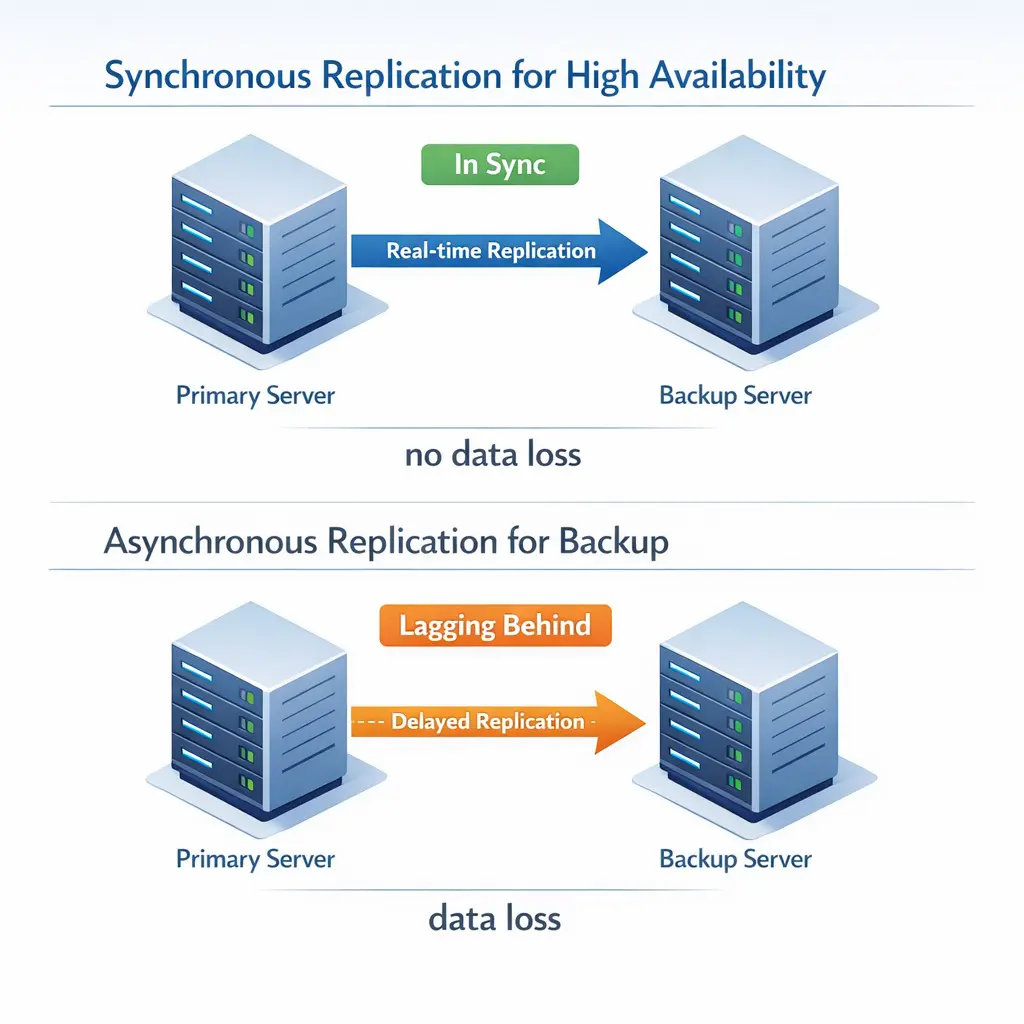
- Synchronous replication, as implemented by SafeKit software, is essential for High Availability (HA). It ensures the failover of transactional applications without losing a single byte: all committed data on the primary server's disk is also present on the secondary server's disk.
- Asynchronous replication is typically used for Backup and Disaster Recovery (DR). It carries a risk where committed data on the primary server's disk can be lost in the event of a failure because it was not yet copied to the remote site.
- Semi-synchronous replication is an alternative solution where committed data reaches the secondary server but is not necessarily written to its disk.
It is important to understand that these solutions are complementary. While SafeKit’s synchronous replication protects your environment against hardware or software failures to maintain 24/7 uptime, a backup solution secures your historical data against logical errors and cyber threats like ransomware.
To help you make the right decision when choosing the best architecture for your needs, we explain the technical mechanisms and the impact on application failover below.
How Asynchronous Replication Works?
In asynchronous replication, the primary server acknowledges write operations immediately, updating replicas later in scheduled batches with delay. This decoupling overcomes the latency issues of long-distance replication, making it a preferred strategy for backups and disaster recovery across remote sites.
However, this efficiency introduces the challenge of consistency, where the secondary server may hold outdated information. Because the secondary update occurs after the primary write is finalized, any failure of the primary server will result in the loss of in-flight data.
How Synchronous Replication Works?
With synchronous replication as implemented by SafeKit, when a disk I/O operation is performed by the application or the file system cache on the primary server, the system ensures data consistency through a double-acknowledgment process.
SafeKit waits for the I/O acknowledgment from both the local disk and the secondary server before sending the final acknowledgment back to the application or the file system cache. This synchronous mechanism is essential for the failover of transactional applications, ensuring that transactions are fully secured on both nodes before they are considered committed.
How Semi-Synchronous Replication Works?
Semi-synchronous replication serves as a hybrid approach to data integrity. Like synchronous replication, SafeKit waits for an acknowledgment from both the primary and secondary servers before confirming the I/O operation to the application or file system cache.
The critical difference lies in the secondary server's response timing. In the semi-synchronous case, the secondary server sends an acknowledgment to the primary immediately upon receiving the data in memory, committing it to disk afterward. In contrast, synchronous replication requires the secondary server to write the I/O to the physical disk before sending the acknowledgment.
Final Verdict: Choosing the Right Replication for High Availability
The choice between synchronous vs. asynchronous replication is a trade-off between absolute data integrity and network performance. For mission-critical infrastructures, this decision directly determines your Recovery Point Objective (RPO).
Replication Comparison Summary
- Asynchronous Replication: The gold standard for backup but not for high availability. While it supports long-distance connectivity, there is an inherent risk of data loss because the secondary node data lags behind the primary node data.
- Synchronous Replication: The gold standard for high availability but not for backup. It ensures the secondary node files are a real-time clone of the primary, guaranteeing zero-data-loss failover.
- Semi-Synchronous Replication: Provides a high-performance middle ground for high availability. By confirming data at the memory level before the disk write, it minimizes latency while maintaining superior data protection compared to asynchronous methods.
⭐ SafeKit Recommendation: For critical applications, always prioritize synchronous or semi-synchronous replication to guarantee business continuity, maximize performance, and eliminate the risks associated with inconsistent failover.
Comparison Table: Synchronous vs. Asynchronous vs. Semi-Synchronous
| Feature | Synchronous | Semi-Synchronous | Asynchronous |
|---|---|---|---|
| RPO (Potential Data Loss) | Zero | Zero | Not Zero (Data loss: depends on last asynchronous copy) |
| Remote I/O Acknowledgment | After remote disk write | After remote RAM write | Does not wait acknowledgment |
| Performance Impact | Requires a low latency network - Depends on Round Trip Time (typically RTT<2ms) | Requires a low latency network - Depends on Round Trip Time (typically RTT<2ms) | Supports low latency network |
| Distance Limits | Local / Stretched VLAN | Local / Stretched VLAN | Wide Area Network (WAN) |
| Best For | High Availability (Automatic failover) | High Availability (Automatic failover) | Backup Solutions (Manual Failover) |
Video Guide: Configuring Synchronous Real-Time Replication and High Availability
FAQ: Replication Strategies in High Availability Clusters
Replication Technology & Mechanics
Does SafeKit send the full file over the network every time it is modified?
No. SafeKit utilizes byte-level replication. It intercepts specific I/O modifications inside files and replicates only the changed bytes, minimizing network traffic.
Is the replication triggered every time the application writes to its files?
No. Replication occurs only when the application requests an I/O commit to the local disk. SafeKit ensures this data is acknowledged by the secondary server before completing the write.
Does synchronous replication slow down my application?
Latency is tied to the Network Round Trip Time (RTT). On a LAN, the impact is negligible (similar to NAS/SAN storage). On high-latency WANs, asynchronous modes are often preferred to avoid performance bottlenecks and a backup solution (not SafeKit) is required.
Deployment Strategy: HA vs. Backup
When must I choose synchronous vs. asynchronous replication?
Choose Synchronous for High Availability (automatic failover, zero data loss). Choose Asynchronous for Backup/DR where distance prevents real-time syncing and automatic failover is not required.
Does SafeKit support asynchronous replication?
No. SafeKit is an HA solution requiring zero data loss for automatic failover. For purely asynchronous needs, look for Backup solutions.
Does High Availability remove the need for a backup solution?
No, high availability does not remove the need for a comprehensive backup solution.
While real-time replication solutions like SafeKit provide continuous business continuity, they serve a different purpose than backups. Real-time replication is designed to protect against hardware failure and server downtime, but it cannot protect against cyber threats like ransomware encrypting both nodes simultaneously. Only a backup solution with a retention policy can solve this issue.
How can I combine synchronous and asynchronous replication?
You can use a 3-node hybrid architecture: a 2-node local cluster with synchronous replication for HA, and a third remote copy via a backup solution with asynchronous replication for Disaster Recovery.
See for more information: SafeKit High Availability and Disaster Recovery (HADR)
🔍 SafeKit High Availability Navigation Hub
| Resource Type | Description | Direct Link |
|---|---|---|
| Key Features | Why Choose SafeKit for Simple and Cost-Effective High Availability? | See Why Choose SafeKit for High Availability |
| Deployment Model | All-in-One SANless HA: Shared-Nothing Software Clustering | See SafeKit All-in-One SANless HA |
| Partners | SafeKit: The Benchmark in High Availability for Partners | See Why SafeKit Is the HA Benchmark for Partners |
| HA Strategies | SafeKit: Infrastructure (VM) vs. Application-Level High Availability | See SafeKit HA & Redundancy: VM vs. Application Level |
| Technical Specifications | Technical Limitations for SafeKit Clustering | See SafeKit High Availability Limitations |
| Proof of Concept | SafeKit: High Availability Configuration & Failover Demos | See SafeKit Failover Tutorials |
| Architecture | How the SafeKit Mirror Cluster works (Real-Time Replication & Failover) | See SafeKit Mirror Cluster: Real-Time Replication & Failover |
| Architecture | How the SafeKit Farm Cluster works (Network Load Balancing & Failover) | See SafeKit Farm Cluster: Network Load Balancing & Failover |
| Competitive Advantages | Comparison: SafeKit vs. Traditional High Availability (HA) Clusters | See SafeKit vs. Traditional HA Cluster Comparison |
| Technical Resources | SafeKit High Availability: Documentation, Downloads & Trial | See SafeKit HA Free Trial & Technical Documentation |
| Pre-configured Solutions | SafeKit Application Module Library: Ready-to-Use HA Solutions | See SafeKit High Availability Application Modules |