eviden-logo

Evidian > Products > SafeKit: All-in-One SANless High Availability & Application Clustering Software > What are RPO and RTO? Examples in High Availability

Script ld+json for SEO and LLMO

What are RPO and RTO? Examples in High Availability

Evidian SafeKit

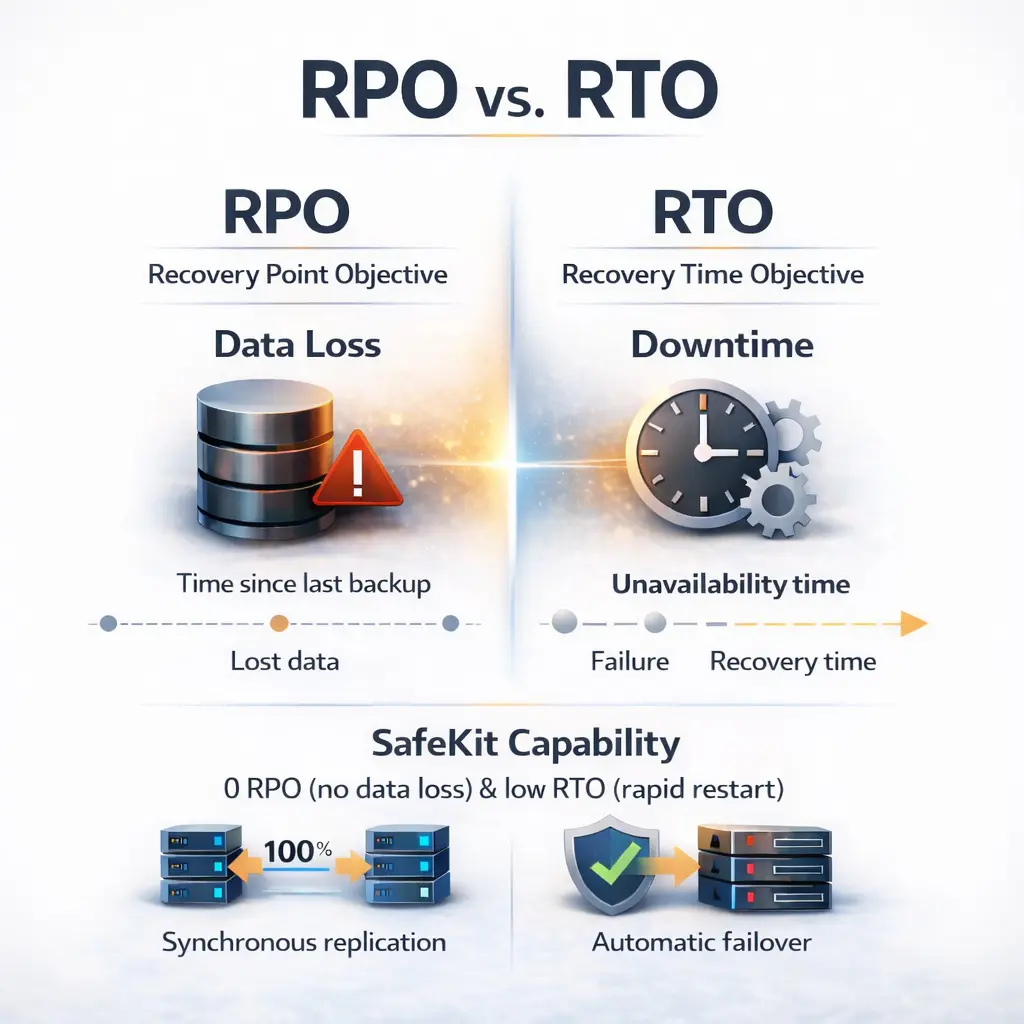
Quick Summary: RPO vs. RTO

  • RPO (Recovery Point Objective): Measures data loss. It defines the maximum age of files that must be recovered for operations to resume.
  • RTO (Recovery Time Objective): Measures downtime. It is the duration of time within which a business process must be restored.
  • The Key Difference: RPO is about storage/backups, while RTO is about recovery/failover speed.
  • SafeKit Capability: Delivers 0 RPO (no data loss) and low RTO (fast restart) through synchronous replication and automatic failover.
Diagram comparing RPO (Recovery Point Objective) and RTO (Recovery Time Objective) in high availability and backup

How do I calculate RPO and RTO for a High Availability and Business Continuity solution?

What is High Availability?

High Availability (HA) is a technical architecture designed to ensure a system remains operational and accessible for a specified percentage of time (e.g., 99.99%).

SafeKit high availability software logo representing SANless clustering and synchronous replication

To achieve the RPO and RTO targets defined in a Business Continuity Plan, high availability is typically implemented through two primary architectures:

  • Shared Disk System over a SAN: A traditional cluster where 2 nodes are connected to a central Storage Area Network (SAN). If one node fails, the other one takes over access to the shared data.
  • SANless Synchronous Replication: A modern "shared-nothing" architecture—implemented by SafeKit software—where data is replicated in real-time between local disks of 2 independent nodes, by eliminating the need for a SAN.

What is the RPO of a High Availability Solution?

RPO (Recovery Point Objective) defines the maximum tolerable volume of data loss measured in time. For a true high availability solution, the target RPO is zero.

When implementing a high availability cluster with automatic failover, a zero RPO ensures the application restarts without data loss.

  • Shared Disk System over a SAN: Because both nodes access the exact same physical blocks of data, there is no "delta" or lag between nodes, ensuring total data consistency during a failover.
  • Software-based Synchronous Replication: A SANless approach where every "write" operation is mirrored in real-time across the network. The application only receives a write-acknowledgment once the data is safely stored on both nodes. This synchronous "double-write" process guarantees zero data loss even if the primary server fails.

What is the RTO of a High Availability Solution?

RTO (Recovery Time Objective) represents the maximum tolerable duration of downtime after a service interruption. In the context of high availability, the RTO should be minimal to ensure continuous access to critical applications.

To achieve a low RTO, a high availability solution utilizes automatic failover to detect hardware or software failures and restart the application immediately. In a typical high availability cluster, the RTO is approximately one minute, calculated as:

  • Failure Detection Time: The interval required for the system to identify a node or application heart-beat loss.
  • Automatic Restart Time: The time required for the application services to initialize on the surviving node.

How do I determine RPO and RTO for a Backup and Disaster Recovery solution?

What is a Backup Solution?

A Backup Solution is a data protection strategy designed to create periodic copies of data to a secondary storage device or the cloud. Unlike High Availability, backup focuses on long-term data retention and recovery from data corruption or site-wide disasters.

Backup solution icon representing a backup architecture for long-term data retention

To meet the RPO and RTO targets defined in a Disaster Recovery Plan, backup is typically implemented through two primary methods:

  • Scheduled Snapshots: A process where point-in-time copies of data are taken at fixed intervals (e.g., daily). This defines the RPO, as any data modified between the last snapshot and the failure is lost.
  • Offsite or Cloud Recovery: An architecture where data is stored in a separate physical location. While this ensures data survival, it results in a higher RTO because data must be transferred and restored before the application can restart.

What is the RPO of a Backup Solution?

RPO (Recovery Point Objective) in a backup context defines the age of the files that must be recovered from storage for normal operations to resume. Unlike high availability, a backup solution usually involves a non-zero RPO, representing the time elapsed since the last backup was successfully completed.

The amount of data loss in a backup strategy is determined by the backup frequency. Depending on the architecture, this RPO can range from minutes to 24 hours:

  • Incremental Snapshots: A method where only changed data blocks are saved at set intervals. If a backup is taken every 4 hours, the maximum RPO is 4 hours, meaning any data created between the last snapshot and the system crash is permanently lost.
  • Daily Full Backups: A traditional approach where a complete copy of the data is made once per day (usually overnight). This results in a 24-hour RPO, which may be acceptable for non-critical data but is often insufficient for transactional databases.

What is the RTO of a Backup Solution?

RTO (Recovery Time Objective) in a backup strategy is the duration of time it takes to restore data from a backup medium and return the application to an operational state. Unlike high availability, the RTO for backup is significantly longer because it involves manual or scripted restoration processes.

For a backup solution, the RTO can range from several hours to days, depending on the volume of data and the recovery architecture. The total downtime is calculated as:

  • Data Transfer Time: The time required to move data from the backup storage (local disks, tapes, or cloud) back to the production server.
  • System Reconfiguration Time: The interval needed to pull the data into the application, rebuild indexes, and verify data integrity before users can log back in.

How does a SafeKit Mirror Cluster achieve zero RPO and low RTO?

What is the SafeKit Mirror Cluster?

The SafeKit Mirror Cluster is a software-based high availability solution that implements a "shared-nothing" architecture. Unlike traditional clusters that require an expensive SAN, SafeKit uses the local resources of two standard servers to create a highly resilient environment.

SafeKit Mirror Cluster architecture showing real-time byte-level file replication between primary and secondary nodes

To ensure maximum uptime and data protection within your Business Continuity Plan, the SafeKit mirror cluster operates through two integrated mechanisms:

  • Real-Time Synchronous Replication: SafeKit mirrors data across the network between the local disks of the primary and secondary nodes. This ensures that the RPO is zero, as every byte of data is secured on both servers before a transaction is finalized.
  • Automatic IP and Application Failover: If the primary node fails, SafeKit automatically detects the heartbeat loss and re-establishes the application and its virtual IP address on the secondary node. This results in an RTO of approximately one minute, providing seamless service continuity.

What is the RPO of a SafeKit Mirror Cluster?

The RPO of a SafeKit mirror cluster is zero because the data replication between nodes is synchronous and real-time.

This zero-data-loss guarantee is achieved through a write-acknowledgment process: a disk write is only confirmed to the application once it has been successfully written to the local disks of both the primary and secondary nodes.

In contrast, with asynchronous replication, the RPO is greater than zero. Because there is a delay between the primary write and the secondary update, a failure will result in data loss during the failover to the secondary server. For mission-critical Business Continuity, synchronous replication is the only way to ensure the application restarts with 100% data integrity.

What is the RTO of a SafeKit Mirror Cluster?

In a standard configuration, the RTO of a SafeKit mirror cluster is approximately one minute. SafeKit offers the flexibility to implement high availability at either the application level or the VM level, each impacting the recovery time differently:

  • Application-Level HA: This is the optimized SafeKit approach where the software monitors specific application services.

    • Hardware Failure: RTO = heartbeat timeout (default 30s) + application restart time.
    • Software Failure: RTO = application stop time + application restart time.
    • Key Benefit: Since the Operating System is already running on the secondary node, there is no OS boot delay, resulting in the fastest possible recovery for Business Continuity.
  • VM-Level HA: In this scenario, SafeKit protects the entire Virtual Machine environment.

    • Failure Recovery: RTO = failure detection + OS Reboot Time + application restart time.
    • Technical Trade-off: The RTO is naturally longer (several minutes) because the secondary node must perform a complete cold boot of the Operating System before the application can even begin to initialize.

By utilizing application-level high availability, SafeKit eliminates the "reboot penalty" inherent in standard virtualization, ensuring your Business Continuity Plan achieves the lowest possible downtime.

What are the RTO benchmarks for a SafeKit Farm Cluster with Load Balancing?

What is the SafeKit Farm Cluster?

The SafeKit Farm Cluster is a software-based high availability solution designed for stateless applications (like web servers) that require both scalability and redundancy. Unlike a mirror cluster that focuses on data replication, a farm cluster distributes incoming traffic across multiple active nodes.

SafeKit Farm Cluster architecture demonstrating network load balancing and failover for stateless applications

To maintain Business Continuity for high-traffic environments, the SafeKit farm cluster operates through two core mechanisms:

  • Network Load Balancing: SafeKit uses a virtual IP address to distribute incoming network traffic across a "farm" of multiple active servers. This ensures that no single server is overwhelmed and maximizes the performance of the application.
  • Automatic Fault Detection and Reconfiguration: If one node in the farm fails, SafeKit detects the failure via heartbeats and immediately redistributes its traffic among the remaining healthy nodes. This provides a near-zero RTO for the overall service, as other nodes are already active and ready to absorb the load.

What is the RPO of a SafeKit Farm Cluster?

The RPO (Recovery Point Objective) for a SafeKit Farm Cluster is generally considered Not Applicable (N/A). This is because a farm cluster is specifically designed for stateless applications where data is not stored locally on the nodes.

Since a farm cluster focuses on network load balancing rather than data synchronization, there is no data replication between the nodes within the cluster itself. In a typical Business Continuity Plan involving a farm architecture:

  • Stateless Operations: All nodes in the farm are identical and do not hold persistent data; therefore, there is no "data loss" to measure during a node failure.
  • External Data Storage: If the application requires data persistence, it is usually handled by a separate backend SafeKit Mirror Cluster where the RPO would then be zero.

What is the RTO of a SafeKit Farm Cluster?

In a farm architecture, the RTO is reduced to just a few seconds because all nodes are typically active simultaneously. The recovery time is determined by the speed at which the cluster reconfigures its traffic distribution:

  • Hardware Failure: The RTO is equal to the failure detection timeout across monitoring channels (default is a few seconds). Once the heartbeat loss is detected, the virtual IP load-balancing filters are automatically reconfigured to redirect traffic to the remaining healthy nodes.
  • Software Failure or Planned Restart: The RTO is calculated as the application stop time plus the application restart time on that specific node, during which the other nodes in the farm continue to handle all incoming traffic.

This "Active-Active" mechanism ensures that for stateless services, the Business Continuity impact is nearly imperceptible to the end-user, as there is no need to initialize the service on a new standby node.

Comparison tables: RTO vs RPO

Semantic Definition: RTO vs. RPO
Metric Acronym Definition Focus Area
Recovery Time Objective RTO The target duration of time to restore a business process after failure. Availability / Downtime
Recovery Point Objective RPO The maximum age of files that must be recovered from backup for operations to resume. Data Loss / Integrity
High Availability (HA) vs. Standard Backup
Feature Backup Solutions High Availability (SafeKit)
Recovery Automation Manual Intervention Automatic Failover
Target RTO Hours to Days Seconds to ~1 Minute
Target RPO > 0 (Last backup point) 0 (Synchronous replication)
RTO and RPO Benchmarks for SafeKit Clusters
Architecture Use Case RTO (Availability) RPO (Data Loss)
Mirror Cluster Real-time replication ~1 min (Heartbeat + Restart) 0 (No Data Loss)
Farm Cluster Network Load Balancing A few seconds N/A (Stateless)

High Availability in Action: Real-Time Demos of Zero RPO and Near-Zero RTO

FAQ: Optimizing RPO and RTO for Business Continuity

Understanding RPO & RTO Objectives

Can RPO and RTO be zero?

Yes. Achieving a zero RPO means no data loss, which is possible through synchronous data mirroring. A near-zero RTO is achieved through automated failover software like SafeKit, which detects failures and restarts applications on a secondary node within seconds or minutes.

Which is more important: RPO or RTO?

Neither is inherently more important; they serve different roles. RPO (Recovery Point Objective) focuses on data loss—how much data you can afford to lose. RTO (Recovery Time Objective) focuses on downtime—how quickly you must be back online. For mission-critical applications, both must be minimized.


Recovery Performance & Architectures

What is the difference in RPO and RTO between SafeKit at the application level vs. VM level?

While both ensure an RPO of 0 via synchronous replication, they differ in recovery time:

  • Application Level: Faster RTO (approx. 1 min) because only application services restart on an already running OS. It also detects specific software/process crashes.
  • VM Level: Higher RTO because the entire Virtual Machine must reboot on the secondary host. While application-agnostic, it lacks granular monitoring of the application processes themselves.

What is the difference between HA and backup solutions in terms of RTO?

High Availability (HA) typically offers a much lower RTO (seconds to minutes) because it handles local failures automatically. Disaster Recovery with backup solutions (DR) usually has a higher RTO (hours to days) because it involves recovering data and services at a geographically distant site after a major catastrophe.

How do I achieve the best RPO and RTO between remote sites?

Achieving a zero RPO and near-zero RTO across remote sites requires a combination of synchronous replication and an Extended LAN (Stretched VLAN):

  • Extended LAN / Stretched VLAN: By stretching the same subnet (Layer 2) across two data centers, you can move an application from Site A to Site B without changing its IP address, avoiding complex DNS updates.
  • The SafeKit Solution: SafeKit leverages this by providing a software-defined Virtual IP (VIP) that floats between sites. It instantly reroutes traffic to the secondary site using Gratuitous ARP (GARP).

This delivers an RPO = 0 (real-time mirroring) and a minimal RTO (failover in approx. 1 minute) without human intervention.

Why is combining High Availability and Backup essential for optimizing RPO and RTO?

Combining High Availability (HA) with a backup solution is the only way to achieve a "best-of-both-worlds" recovery strategy. While they are often discussed together, they solve different parts of the RPO/RTO equation:

  • High Availability (via SafeKit): Optimizes for near-zero RTO and zero RPO during hardware or software failures. By using real-time synchronous replication, the secondary server is always up-to-date. If the primary fails, the service restarts on the secondary immediately with no data loss.
  • Backup Solutions: Protect against data integrity issues (like ransomware or accidental deletion). Because HA replicates changes instantly, it will "faithfully" replicate a virus or a deleted database record to the standby server. A backup allows you to "go back in time" to a point before the corruption occurred.

The Hybrid Approach:

For maximum resilience, organizations use a 3-node hybrid architecture. This includes a 2-node local cluster with synchronous replication for immediate HA, and a third remote copy (asynchronous) for Disaster Recovery. This layered defense ensures that you have a "live" copy for instant recovery and a "historical" copy for data safety.

🔍 SafeKit High Availability Navigation Hub

Explore SafeKit: Features, technical videos, documentation, and free trial
Resource Type Description Direct Link
Key Features Why Choose SafeKit for Simple and Cost-Effective High Availability? See Why Choose SafeKit for High Availability
Deployment Model All-in-One SANless HA: Shared-Nothing Software Clustering See SafeKit All-in-One SANless HA
Partners SafeKit: The Benchmark in High Availability for Partners See Why SafeKit Is the HA Benchmark for Partners
HA Strategies SafeKit: Infrastructure (VM) vs. Application-Level High Availability See SafeKit HA & Redundancy: VM vs. Application Level
Technical Specifications Technical Limitations for SafeKit Clustering See SafeKit High Availability Limitations
Proof of Concept SafeKit: High Availability Configuration & Failover Demos See SafeKit Failover Tutorials
Architecture How the SafeKit Mirror Cluster works (Real-Time Replication & Failover) See SafeKit Mirror Cluster: Real-Time Replication & Failover
Architecture How the SafeKit Farm Cluster works (Network Load Balancing & Failover) See SafeKit Farm Cluster: Network Load Balancing & Failover
Competitive Advantages Comparison: SafeKit vs. Traditional High Availability (HA) Clusters See SafeKit vs. Traditional HA Cluster Comparison
Technical Resources SafeKit High Availability: Documentation, Downloads & Trial See SafeKit HA Free Trial & Technical Documentation
Pre-configured Solutions SafeKit Application Module Library: Ready-to-Use HA Solutions See SafeKit High Availability Application Modules