

eviden-logo

Evidian > Products > SafeKit: All-in-One SANless High Availability & Application Clustering Software > Heartbeat, failover and quorum in a Windows or Linux cluster

Heartbeat, failover and quorum in a Windows or Linux cluster

Evidian SafeKit

What are the different scenarios in case of network isolation in a cluster?

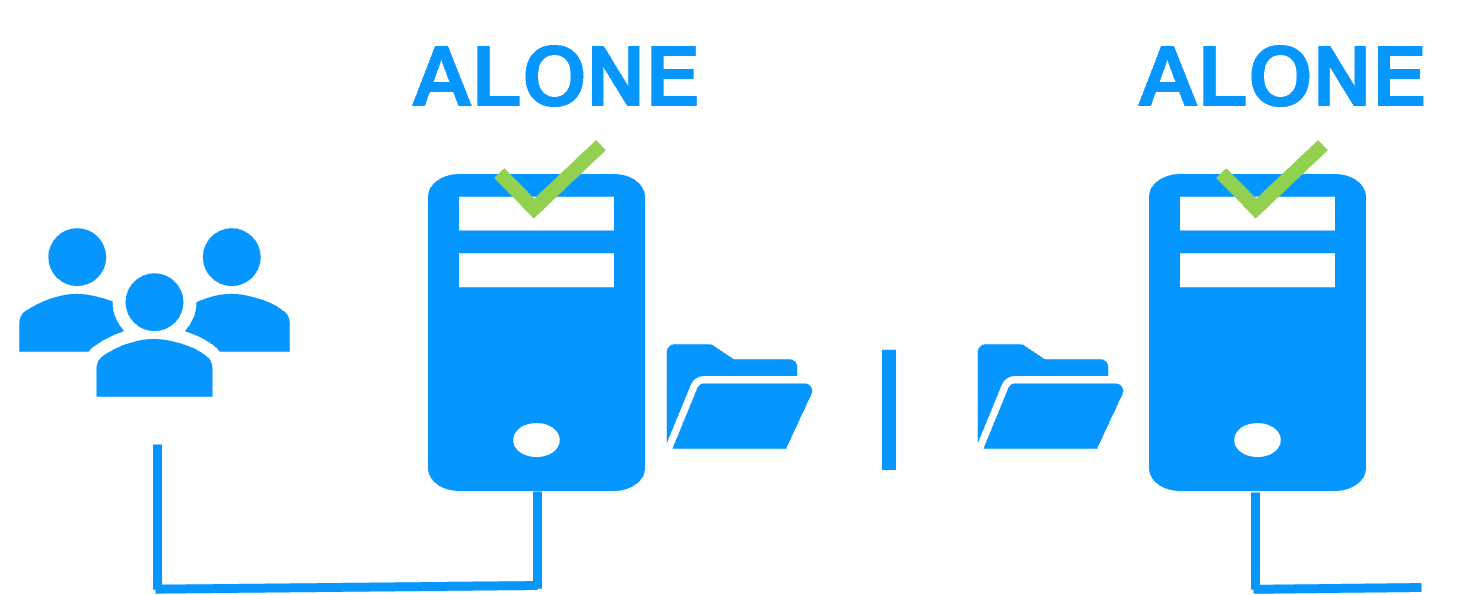
A single network

When there is a network isolation, the default behavior is:

  • as heartbeats are lost for each node, each node goes to ALONE and runs the application with its virtual IP address (double execution of the application modifying its local data),
  • when the isolation is repaired, one ALONE node is forced to stop and to resynchronize its data from the other node,
  • at the end the cluster is PRIM-SECOND (or SECOND-PRIM according the duplicate virtual IP address detection made by Windows).

Two networks with a dedicated replication network

When there is a network isolation, the behavior with a dedicated replication network is:

  • a dedicated replication network is implemented on a private network,
  • heartbeats on the production network are lost (isolated network),
  • heartbeats on the replication network are working (not isolated network),
  • the cluster stays in PRIM/SECOND state.

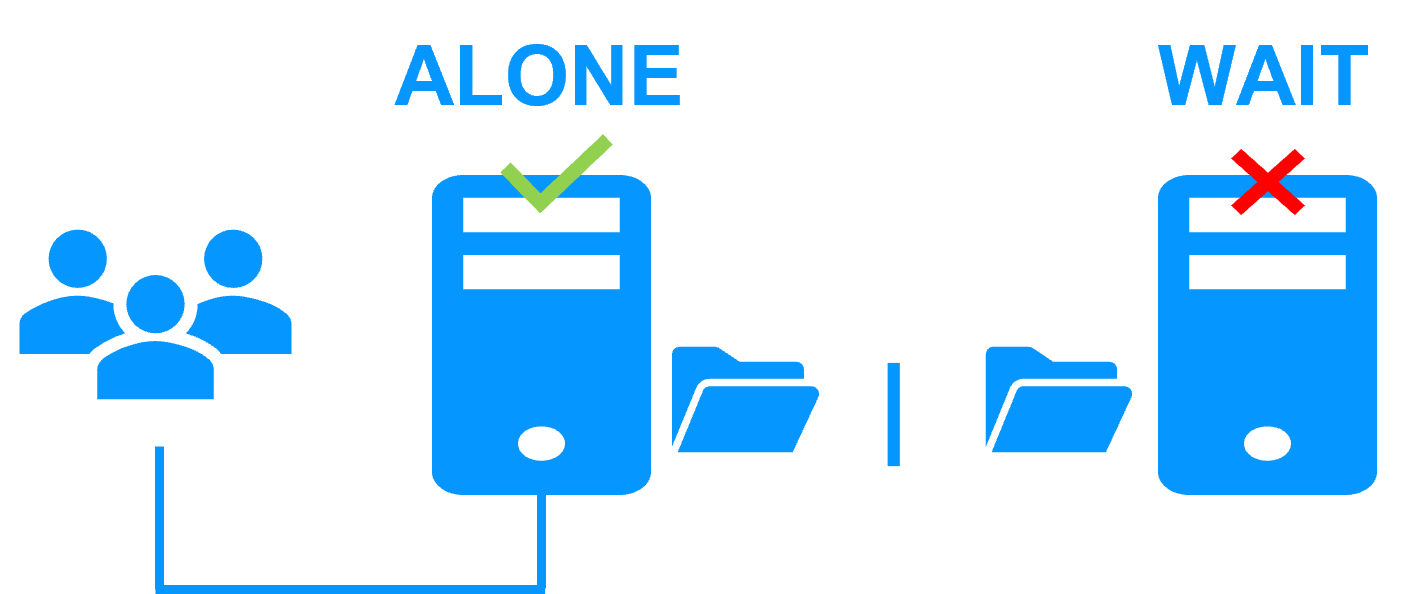
A single network and a splitbrain checker

When there is a network isolation, the behavior with a split-brain checker is:

  • a split-brain checker has been configured with the IP address of a witness (typically a router),
  • the split-brain checker operates when a server goes from PRIM to ALONE or from SECOND to ALONE,
  • in case of network isolation, before going to ALONE, both nodes test the IP address,
  • the node which can access the IP address goes to ALONE, the other one goes to WAIT,
  • when the isolation is repaired, the WAIT node resynchronizes its data and becomes SECOND.

Note: If the witness is down or disconnected, both nodes go to WAIT and the application is no more running. That's why you must choose a robust witness like a router.

How heartbeats and failover work in a Windows or Linux cluster?

What is a heartbeat?

The basic mechanism for synchronizing two servers and detecting server failures is the heartbeat, which is a monitoring data flow on a network shared by a pair of servers.

The SafeKit software supports as many heartbeats as there are networks shared by two servers. 

The heartbeat mechanism is used to implement Windows and Linux clusters. It is integrated within the SafeKit mirror cluster with real-time file replication and failover.

SafeKit heartbeats

In normal operation, the two servers exchange their states (PRIM, SECOND, the resource states) through the heartbeat channels and synchronize their application start and stop procedures.

In particular, in case of a scheduled failover, the stop script which stops the application is first executed on the primary server, before executing the start script on the secondary server. Thus, replicated data on the secondary server are in a safe state corresponding to a clean stop of the application.

Loss of all heartbeats

When all heartbeats are lost on one server, this server considers the other server to be down and transitions to the ALONE state.

If it is the SECOND server which goes to the ALONE state, then there is an application failover with restart of the application on the secondary server.

Although not mandatory, it is better to have two heartbeat channels on two different networks for synchronizing the two servers in order to separate the network failure case from the server failure one.

Split brain problem and quorum when servers are in two remote computer rooms

Heartbeat, failover and quorum in a Windows or Linux cluster

Remote computer rooms

A high availability cluster securing a critical application can be implemented with two servers in two geographically remote computer rooms.

Thus, the solution supports the disaster of a full room.

Split brain

In situation of a network isolation between both computer rooms, all heartbeats are lost and the split brain problem arises.

Both servers start the critical application.

Complexity of solutions

Mostoften, to solve split brain, quorum is implemented with a third quorum server or a special quorum disk to avoid the double masters.

Unfortunately these new quorum devices add cost and complexity to the overall clustering architecture.

Simple cluster quorum with the SafeKit split brain checker

SafeKit split brain checker

With the SafeKit high availability software, the quorum within a Windows or Linux cluster requires no third quorum server and no quorum disk. A simple split brain checker is sufficient to avoid the double execution of an application.

On the the loss of all heartbeats between servers, the split brain checker selects only one server to become the primary. The other server goes into the WAIT state, until it receives the other server's heartbeats again. It then goes back to secondary after having synchronized replicated data from the primary server.

How the split brain checker works?

The primary server election is based on the ping of an IP address, called the witness. The witness is typically a router that is always available. In case of network isolation, only the server with access to the witness will be primary ALONE, the other will go to WAIT.

The witness is not tested permanently but only when all heartbeats are lost. If at that time, the witness is down, the cluster goes into the WAIT-WAIT state and an administrator can choose to restart one of the servers as primary through the SafeKit web console.

What happens without a split brain checker?

In case of network isolation, both servers will go to the ALONE state running the critical application. The replicated directories are isolated and each application is working on its own data in its own directory.

When the network is reconnected, SafeKit by default chooses the server which was PRIM before the isolation as the new primay and forces the other one as SECOND with a resynchronization of all its data from the PRIM.

Note: Windows can detect a duplicate IP address on one server and remove the virtual IP address on this server. SafeKit has a checker to force a restart in that case.

🔍 SafeKit High Availability Navigation Hub

Explore SafeKit: Features, technical videos, documentation, and free trial
Resource Type Description Direct Link
Key Features Why Choose SafeKit for Simple and Cost-Effective High Availability? See Why Choose SafeKit for High Availability
Deployment Model All-in-One SANless HA: Shared-Nothing Software Clustering See SafeKit All-in-One SANless HA
Partners SafeKit: The Benchmark in High Availability for Partners See Why SafeKit Is the HA Benchmark for Partners
HA Strategies SafeKit: Infrastructure (VM) vs. Application-Level High Availability See SafeKit HA & Redundancy: VM vs. Application Level
Technical Specifications Technical Limitations for SafeKit Clustering See SafeKit High Availability Limitations
Proof of Concept SafeKit: High Availability Configuration & Failover Demos See SafeKit Failover Tutorials
Architecture How the SafeKit Mirror Cluster works (Real-Time Replication & Failover) See SafeKit Mirror Cluster: Real-Time Replication & Failover
Architecture How the SafeKit Farm Cluster works (Network Load Balancing & Failover) See SafeKit Farm Cluster: Network Load Balancing & Failover
Competitive Advantages Comparison: SafeKit vs. Traditional High Availability (HA) Clusters See SafeKit vs. Traditional HA Cluster Comparison
Technical Resources SafeKit High Availability: Documentation, Downloads & Trial See SafeKit HA Free Trial & Technical Documentation
Pre-configured Solutions SafeKit Application Module Library: Ready-to-Use HA Solutions See SafeKit High Availability Application Modules
FAQ Frequently Asked Questions on Architecture, Technical specs, Features See SafeKit HA FAQ