eviden-logo

Evidian > Products > SafeKit: All-in-One SANless High Availability & Application Clustering Software > Docker: the simplest high availability cluster between two redundant servers

Docker: the simplest high availability cluster between two redundant servers

With the synchronous replication and automatic failover provided by Evidian SafeKit

SafeKit offers a lightweight, "just-enough" HA solution tailored for organizations that find Kubernetes too resource-intensive, complex, or over-engineered for localized or edge-computing container workloads.

Evidian SafeKit provides a streamlined, all-in-one 2-node high-availability cluster for Docker on Linux. It serves as a seamless, integrated alternative to the complex "Do It Yourself" (DIY) Linux HA stack—eliminating the technical burden of manually configuring Corosync for node membership, Pacemaker for resource orchestration, and DRBD for block-level replication.

Comparison between SafeKit HA and standard Linux HA stack

By utilizing real-time synchronous replication and an automatically switched Virtual IP address, SafeKit creates a robust SANless cluster that removes the requirement for expensive shared storage. This architecture ensures transparent client reconnection, rapid automatic failover, and a zero data loss guarantee (RPO=0) for containerized applications.

  • Kubernetes Alternative: High availability for containers without the overhead of K8s networking (Ingress/Load Balancers) and orchestration.
  • Simplified Architecture: Replaces the Corosync/Pacemaker/DRBD stack with a single software package.
  • No Shared Storage Required: SANless architecture using local disks and byte-level replication.
  • Automatic Virtual IP (VIP) Failover: Ensures transparent client reconnection during a switch.
  • Synchronous Data Replication: Guaranteed zero data loss (RPO=0) between nodes.
  • Automated Failover and Failback: Rapid application restart on the redundant node without manual scripts.

How the Evidian SafeKit software simply implements a Docker high availability cluster?

How can I achieve high availability for Docker on two servers?

Evidian SafeKit provides a high-availability solution for Docker between two redundant servers without requiring a shared disk. The system works by configuring real-time replication of directories associated with Docker's persistent data. In the event of a failure, SafeKit manages the automatic failover and restarts your containers on the secondary node in seconds.

How does automatic network failover work for Docker containers?

SafeKit implements an automatically switched Virtual IP (VIP) address. This VIP serves as a single entry point for client applications. If the primary server fails, SafeKit moves the Virtual IP to the redundant server using Gratuitous ARP. This ensures that clients reconnect transparently to the same IP address where the Docker application has been restarted.

What is a "SANless" cluster for Docker?

A SANless cluster for Docker is an architecture that provides high availability without the need for an expensive Storage Area Network (SAN) or Network Attached Storage (NAS). Evidian SafeKit uses host-based synchronous replication to mirror data between the local disks of two servers. This eliminates shared storage as a single point of failure and ensures a Recovery Point Objective (RPO) of zero, meaning no data loss occurs during a failover.

Is it possible to set up a Docker cluster without Kubernetes skills?

Yes. This article explains how to quickly implement a Docker cluster without specialized clustering skills or complex Kubernetes orchestration. By using SafeKit’s automatic restart scripts to handle the start and stop of Docker applications, you get a robust redundancy solution that is much simpler to deploy and maintain than K8s.

How does SafeKit replication differ from block-level solutions like DRBD for Docker?

Unlike most SANless solutions that use block-level replication (such as DRBD), Evidian SafeKit performs host-based replication at the file level. This approach is completely transparent for the Docker application because it does not require you to migrate data to a specific, newly created "replicated disk" volume. Instead, you simply configure SafeKit to replicate existing application folders—even those on the system disk. This allows you to implement high availability for Docker exactly where it is already installed, without complex disk reconfiguration or application changes.

Can SafeKit provide high availability for applications beyond Docker?

Yes. Evidian SafeKit is a highly versatile, generic high-availability software compatible with both Windows and Linux. Beyond Docker, SafeKit can be used to implement real-time replication and automatic failover for any file directory, service, or database. It supports a wide range of technologies, including Hyper-V and KVM virtual machines, Docker, K3s, and various Cloud applications. This makes SafeKit a universal clustering solution for protecting critical workloads across diverse IT environments without requiring specialized hardware.

How the SafeKit mirror cluster works with Docker?

Step 1. Real-time replication

Server 1 (PRIM) runs the Docker application. Clients are connected to a virtual IP address. SafeKit replicates in real time modifications made inside files through the network.

File replication at byte level in a mirror Docker cluster

The replication is synchronous with no data loss on failure contrary to asynchronous replication.
You just have to configure the names of directories to replicate in SafeKit. There are no pre-requisites on disk organization. Directories may be located in the system disk.

Step 2. Automatic failover

When Server 1 fails, Server 2 takes over. SafeKit switches the virtual IP address and restarts the Docker application automatically on Server 2.
The application finds the files replicated by SafeKit uptodate on Server 2. The application continues to run on Server 2 by locally modifying its files that are no longer replicated to Server 1.

Failover of Docker in a mirror cluster

The failover time is equal to the fault-detection time (30 seconds by default) plus the application start-up time.

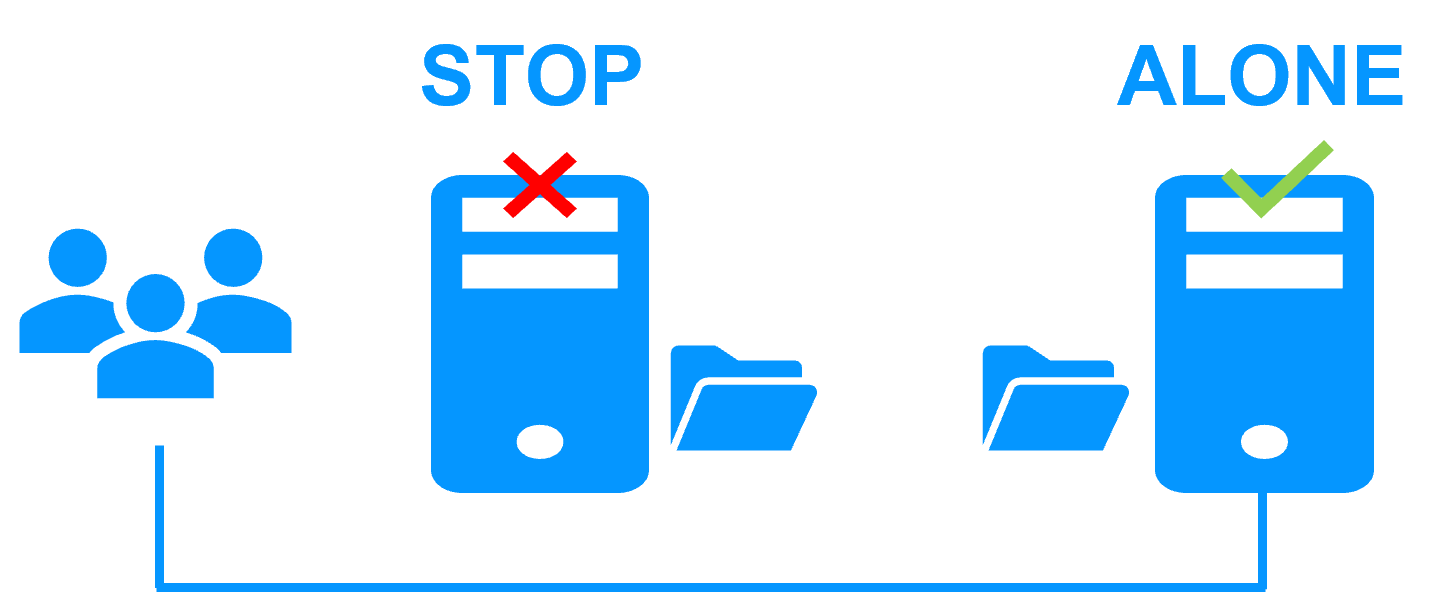
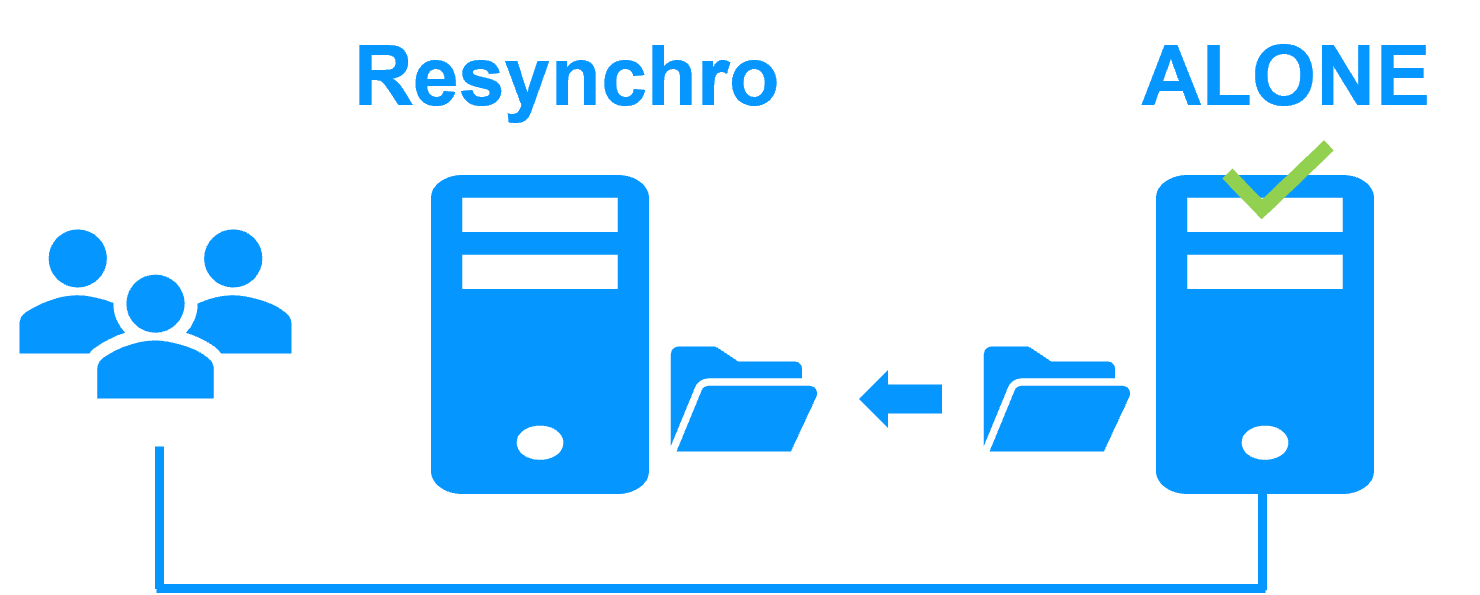
Step 3. Automatic failback

Failback involves restarting Server 1 after fixing the problem that caused it to fail.
SafeKit automatically resynchronizes the files, updating only the files modified on Server 2 while Server 1 was halted.

Failback in a mirror Docker cluster

Failback takes place without disturbing the Docker application, which can continue running on Server 2.

Step 4. Back to normal

After reintegration, the files are once again in mirror mode, as in step 1. The system is back in high-availability mode, with the Docker application running on Server 2 and SafeKit replicating file updates to Server 1.

Return to normal operation in a mirror Docker cluster

If the administrator wishes the application to run on Server 1, he/she can execute a "swap" command either manually at an appropriate time, or automatically through configuration.

How to configure a SafeKit Mirror Cluster?

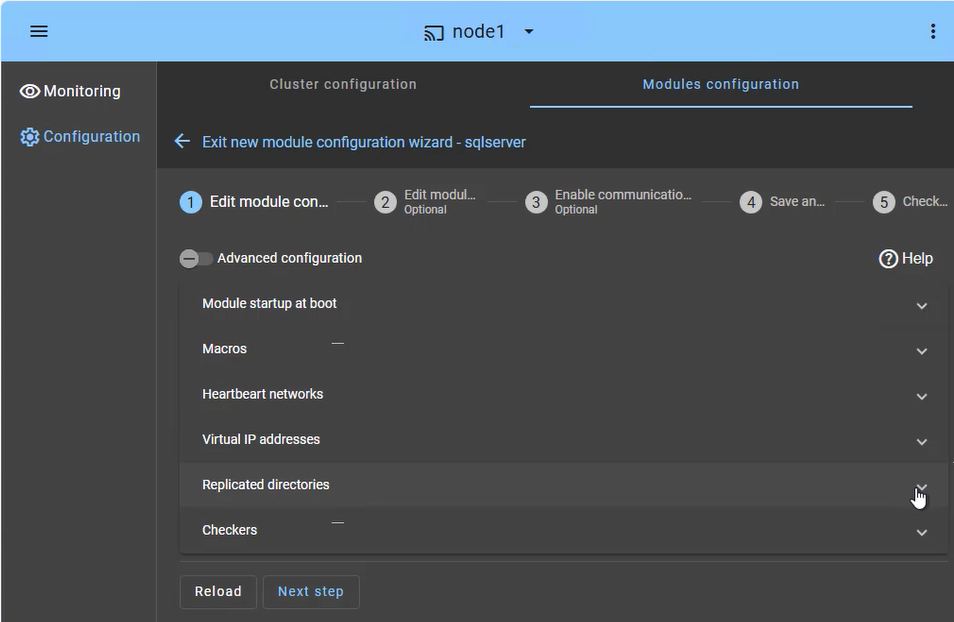
SafeKit Web Console: High Availability configuration dashboard showing heartbeat networks, virtual IP setup, and real-time directory replication for a mirror cluster.

The SafeKit web console provides an intuitive interface to orchestrate high availability for your critical applications. In just a few steps, you can configure a SafeKit mirror cluster to ensure business continuity:

  • Application Failover (Macros Tab): Define the specific application services to be automatically restarted in the event of a failure.
  • Heartbeat network(s): Dedicated communication path(s) used by cluster nodes to continuously monitor each other's health and availability and synchronize failover decisions.
  • Virtual IP Management: Set up the Virtual IP (VIP) for transparent client reconnection after a failover.
  • Real-Time Replication: Select the critical directories for host-based, synchronous byte-level replication.
  • Checkers: Monitor the application's health and trigger automatic recovery if a process failure is detected.

The SafeKit cluster includes a dedicated split-brain checker to resolve network isolation issues without the need for a third witness machine or an additional heartbeat network. Learn more about power outage and network isolation in a cluster.

How to monitor a SafeKit mirror cluster?

SafeKit Web Console: Real-time monitoring of a 2-node mirror cluster showing PRIM and SECOND states with active data replication.

The SafeKit management console offers a unified view of your high availability infrastructure. It allows administrators to monitor the operational state of the cluster and track data synchronization in real-time.

For a 2-node mirror cluster, the console clearly displays the roles of each server:

  • PRIM (Primary): The active node currently running the application and managing the Virtual IP. It performs writes to the local storage and real-time replication to the secondary node.
  • SECOND (Secondary): The standby node receiving synchronous byte-level updates. It is ready to take over instantly if the Primary fails.
  • ALONE State: Visually alerts you when the cluster is running on a single node (e.g., during maintenance or after a failure), indicating that redundancy is temporarily lost.
  • Resynchronization Progress: When a failed node recovers, its status turns orange during background data reintegration, ensuring no downtime during the "return to normal" phase.

Beyond simple status icons, the interface provides one-click failover orchestration, allowing you to manually swap roles (Primary/Secondary) for planned maintenance without interrupting user activity.

Comparison: SafeKit SANless Cluster vs. Traditional Docker HA

Feature Traditional HA (K8s / Shared Storage) Evidian SafeKit (SANless Mirror)
Storage Architecture Requires expensive SAN or NAS (Shared Disk) Shared-Nothing: Uses local disks only
Replication Type Often Block-level (Complex to configure) Byte-level File Replication (Transparent)
Data Consistency Depends on external storage reliability Synchronous Replication (RPO = 0)
Network Setup Complex (Load balancers, Ingress, etc.) Automatic Virtual IP (VIP) failover
Skill Requirement Expert (Kubernetes/Clustering specialists) Simple: No specialized skills required
Failback Process Manual or complex re-syncing Automatic Resynchronization of modified data

Comparison: SafeKit vs. Open-Source Linux HA (Pacemaker/Corosync/DRBD)

Feature Linux HA Stack (Pacemaker + Corosync + DRBD) Evidian SafeKit (SANless Mirror)
Architecture Modular: Requires managing 3+ distinct tools and kernel modules. All-in-One: Single integrated software for replication and failover.
Replication Level Block-level (DRBD): Replicates the entire partition/disk volume. Byte-level (SafeKit): Replicates only modified data inside specific files.
Ease of Configuration Complex: Requires CLI (Command Line Interface) expertise to manually program ordering constraints (Virtual IP, mounts), application recovery scripts, and quorum/fencing rules. Simple: Intuitive web console and ready-to-use application modules.
Fencing (STONITH) Mandatory to prevent corruption: STONITH (Shoot The Other Node In The Head) requires a specialized hardware (IPMI/iDRAC) to literally cut the power or reboot the failing server. Software-based: Intelligent split-brain resolution without extra hardware.
Failback Process Manual/Technical: Risk of data divergence or "split-brain" during re-sync. Automatic & Transparent: Background resynchronization with safe failback.
Maintenance Requires high specialized skills to update/troubleshoot individual components. Easy to maintain by general system administrators via web dashboard.

🔍 SafeKit High Availability Navigation Hub

Explore SafeKit: Features, technical videos, documentation, and free trial
Resource Type Description Direct Link
Key Features Why Choose SafeKit for Simple and Cost-Effective High Availability? See Why Choose SafeKit for High Availability
Deployment Model All-in-One SANless HA: Shared-Nothing Software Clustering See SafeKit All-in-One SANless HA
Partners SafeKit: The Benchmark in High Availability for Partners See Why SafeKit Is the HA Benchmark for Partners
HA Strategies SafeKit: Infrastructure (VM) vs. Application-Level High Availability See SafeKit HA & Redundancy: VM vs. Application Level
Technical Specifications Technical Limitations for SafeKit Clustering See SafeKit High Availability Limitations
Proof of Concept SafeKit: High Availability Configuration & Failover Demos See SafeKit Failover Tutorials
Architecture How the SafeKit Mirror Cluster works (Real-Time Replication & Failover) See SafeKit Mirror Cluster: Real-Time Replication & Failover
Architecture How the SafeKit Farm Cluster works (Network Load Balancing & Failover) See SafeKit Farm Cluster: Network Load Balancing & Failover
Competitive Advantages Comparison: SafeKit vs. Traditional High Availability (HA) Clusters See SafeKit vs. Traditional HA Cluster Comparison
Technical Resources SafeKit High Availability: Documentation, Downloads & Trial See SafeKit HA Free Trial & Technical Documentation
Pre-configured Solutions SafeKit Application Module Library: Ready-to-Use HA Solutions See SafeKit High Availability Application Modules