eviden-logo

Evidian > Products > SafeKit: All-in-One SANless High Availability & Application Clustering Software > High Availability and Disaster Recovery (HADR) Software without Shared Disks

High Availability and Disaster Recovery (HADR) Software without Shared Disks

Evidian SafeKit

Implementing a robust HADR strategy without shared disks requires a tailored approach based on your network infrastructure. Evidian SafeKit provides a flexible, SANless software solution that unifies High Availability (HA) and Disaster Recovery (DR). Whether your nodes are connected via a high-speed extended LAN or a lower-bandwidth wide area network, the success of your application clustering depends on choosing the right replication methodโ€”synchronous or asynchronousโ€”to balance system distance with data integrity.

Synchronous HADR: Zero Data Loss over Fast Networks (LAN/VLAN)

How to implement HADR over a fast network?

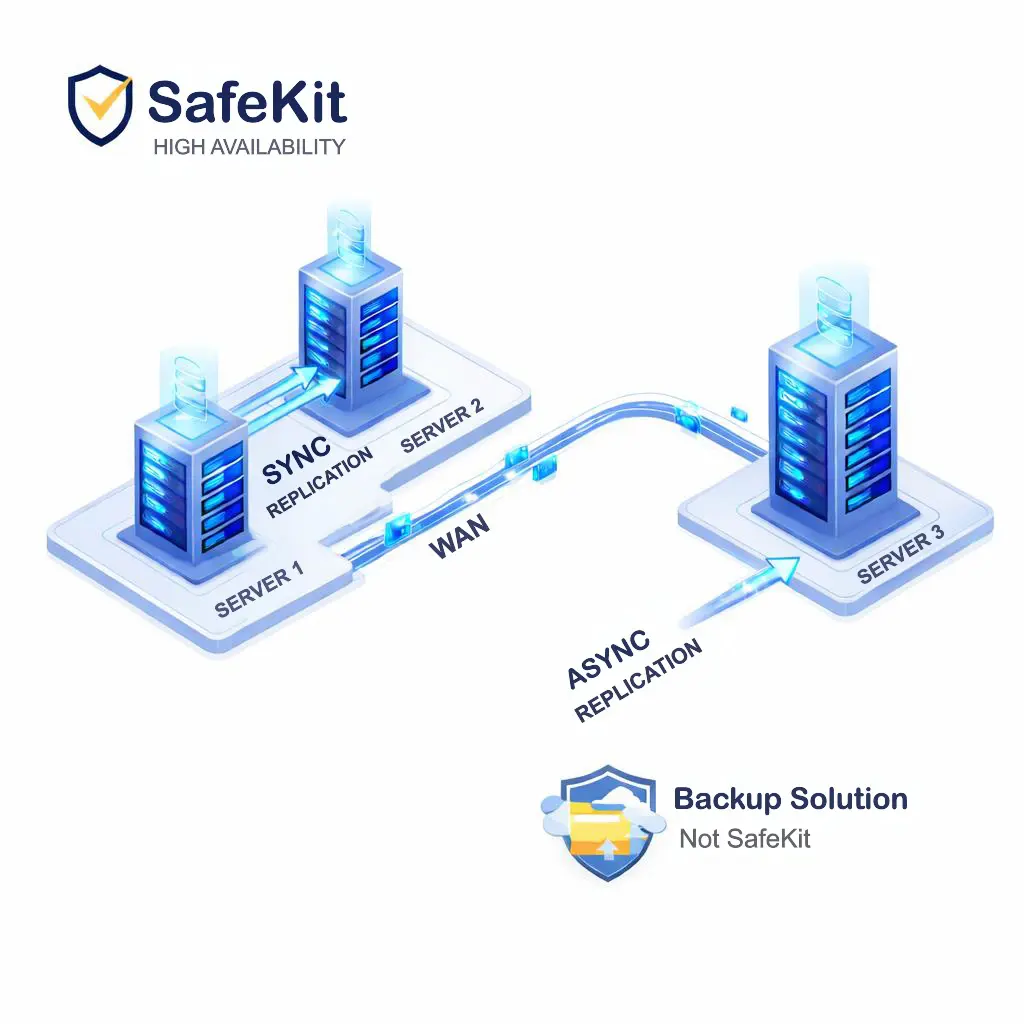
Architecture combining High Availability and Disaster Recovery (HADR) without shared disks

To implement HADR over a fast network, deploy two nodes across remote sites to provide High Availability and Disaster Recovery simultaneously. This setup ensures that your application remains available even if an entire site fails, without the complexity of a shared storage infrastructure.

Why use a SANless HADR solution for fast networks?

A SANless solution like Evidian SafeKit is essential because it replicates data synchronously and in real-time between two nodes without shared disks. Because synchronous replication ensures zero data loss (RPO=0), the software can trigger an automatic application failover instantly if a hardware or software failure occurs.

What are the network requirements for Synchronous HADR?

Synchronous HADR requires an extended LAN or a stretched VLAN for three critical reasons:

  • Virtual IP Failover: A single subnet is required to automatically failover the virtual IP address between nodes.
  • Low Latency: Synchronous replication with no data loss typically requires a network round-trip time of less than 2ms.
  • High Bandwidth: A connection of 1 Gb/s or more is required to ensure rapid data resynchronization during a failback.

Asynchronous HADR: Disaster Recovery over Slow Networks (WAN)

How to implement HADR over a slow network?
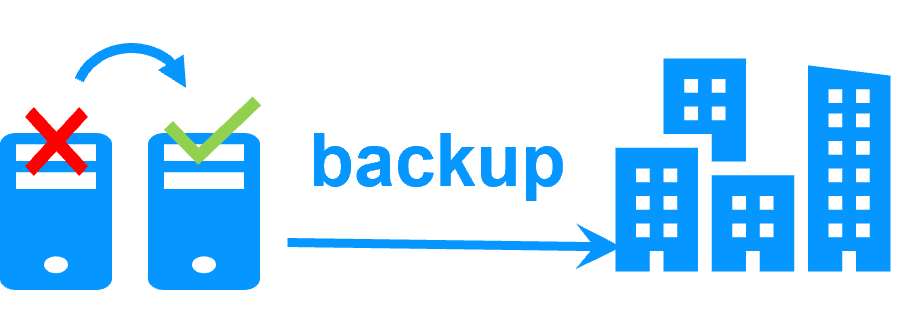
HADR architecture separating High Availability from Disaster Recovery

To implement HADR over a slow network (WAN), the architecture typically separates High Availability from Disaster Recovery. In this scenario, two nodes are deployed at the primary site for local redundancy, while a separate backup or asynchronous replication strategy is used to protect data at a distant remote site.

What is the best HADR solution for low-bandwidth connections?

The optimal solution involves deploying Evidian SafeKit at the primary site for local High Availability using synchronous real-time replication and automatic failover. For the disaster recovery site, data is protected via asynchronous replication or scheduled backups through the slow network, ensuring that local uptime is maintained without being bottlenecked by WAN latency. To achieve this architecture, a dedicated backup solution (other than SafeKit) is required to manage the data transfer and restoration at the remote site.

How does failover work with a remote Disaster Recovery site?

Because asynchronous replication over a slow network involves potential data loss (RPO > 0), the failover process to a disaster recovery site is typically manual and managed by an administrator:

  • Data Restoration: Backups are restored onto secondary servers at the DR site. Modern solutions like Veeam are often used to restore virtual machines (VMs) quickly to reduce recovery time.
  • DNS Rerouting: Traffic is redirected to the DR site at the DNS level. The recovery time depends on DNS cache timeouts (TTL), and some client applications may require a restart to pick up the new IP address.
  • Manual Decision: An administrator must verify data integrity at the remote site before authorizing the switch to the secondary data center.

How to Combine HADR and Backup for Total System Resilience

Comparing High Availability and Data Backup
SafeKit high availability software logo Data Backup strategy icon

Although both are critical for data protection, High Availability (HA) and Backup Solutions target different risks. High Availability, powered by SafeKit, provides a "live" failover mechanism to keep applications accessible during server outages or hardware failures. Conversely, a Backup Solution acts as a "historical" archive. While HA ensures 99.99% system availability by replicating data in real-time, backup focuses on data integrity, providing the necessary restoration points to recover from logical errors, accidental deletions, or ransomware attacks.

Is High Availability a substitute for a Backup strategy?

No, High Availability and backups are complementary, not interchangeable. While SafeKit ensures business continuity by keeping applications running during a hardware crash, it does not guard against logical errors, accidental deletions, or ransomware attacks. For example, because real-time replication mirrors every change instantly, a ransomware attack on the primary node will be immediately duplicated on the secondary node. To recover from such cyber threats or accidental deletions, you need a dedicated backup solution with a robust retention policy. This allows you to "rewind" your environment to a healthy state from before the corruption occurred.

Optimizing RTO and RPO: The Synergy Between HA and Backup

To build a truly resilient infrastructure, you must integrate both High Availability and backup into a unified strategy. These two technologies address different dimensions of the RTO (Recovery Time Objective) and RPO (Recovery Point Objective) equation:
  • High Availability (via SafeKit): Targets Instant Recovery. By maintaining a live, synchronous mirror of your environment, SafeKit achieves near-zero RTO and zero RPO. If a server fails, the application resumes on the secondary node immediately, ensuring no service interruption or data loss during the transition.
  • Backup Solutions: Target Data Resilience. While HA keeps the service "live," backup creates an "immutable" history. It is your fallback for when the live data itself is compromised, allowing you to restore a clean version of your database from a specific point in time before a virus or accidental deletion occurred.

Comparison of HADR Architectures: Fast vs. Slow Networks

Criteria Fast Network (LAN/VLAN) Slow Network (WAN)
Primary Scope Local Redundancy & High Availability Site-to-Site Disaster Recovery
Use Case Same Data Center or Campus Remote Data Centers or Cloud Regions
Replication Type Synchronous (Real-time) Asynchronous / Backup
RPO (Data Loss) Zero (RPO = 0) Potential data loss (RPO > 0)
Failover Process Automatic Manual (Admin decision)
Traffic Rerouting Virtual IP Address (VIP) DNS Level (TTL dependent)
Latency Requirement Low (typically < 2ms) Supports high latency
Primary Recovery Goal Immediate Business Continuity Data Safety & Retention

Video Guide: How to Implement HADR with SafeKit


How to Implement HADR with SafeKit: Synchronous Replication & Failover

Learn how to combine High Availability (HA) and Disaster Recovery (DR) into a single HADR strategy using Evidian SafeKit. This video guide explores the architecture required for 100% application uptime without the need for shared disks.

Video Highlights

  1. Architecture overview: SafeKit HADR over Stretched VLANs (0:56)
  2. Synchronous Mirroring & Double-Acknowledgment explained (1:26)
  3. Failover Mechanics: Gratuitous ARP (GARP) & Virtual IP (1:53)
  4. Designing for Slow WAN: HA vs. Backup Strategies (2:27)

๐Ÿ” SafeKit High Availability Navigation Hub

Explore SafeKit: Features, technical videos, documentation, and free trial
Resource Type Description Direct Link
Key Features Why Choose SafeKit for Simple and Cost-Effective High Availability? See Why Choose SafeKit for High Availability
Deployment Model All-in-One SANless HA: Shared-Nothing Software Clustering See SafeKit All-in-One SANless HA
Partners SafeKit: The Benchmark in High Availability for Partners See Why SafeKit Is the HA Benchmark for Partners
HA Strategies SafeKit: Infrastructure (VM) vs. Application-Level High Availability See SafeKit HA & Redundancy: VM vs. Application Level
Technical Specifications Technical Limitations for SafeKit Clustering See SafeKit High Availability Limitations
Proof of Concept SafeKit: High Availability Configuration & Failover Demos See SafeKit Failover Tutorials
Architecture How the SafeKit Mirror Cluster works (Real-Time Replication & Failover) See SafeKit Mirror Cluster: Real-Time Replication & Failover
Architecture How the SafeKit Farm Cluster works (Network Load Balancing & Failover) See SafeKit Farm Cluster: Network Load Balancing & Failover
Competitive Advantages Comparison: SafeKit vs. Traditional High Availability (HA) Clusters See SafeKit vs. Traditional HA Cluster Comparison
Technical Resources SafeKit High Availability: Documentation, Downloads & Trial See SafeKit HA Free Trial & Technical Documentation
Pre-configured Solutions SafeKit Application Module Library: Ready-to-Use HA Solutions See SafeKit High Availability Application Modules