
eviden-logo

Evidian > Products > SafeKit: Simple, Cost-Effective High Availability Software > Clustering software with load balancing, mirroring and failover

Clustering software with load balancing, mirroring and failover

Evidian SafeKit

High availability and scalability of critical web and database applications with the SafeKit clustering software

Load balancing, mirroring and failover

SafeKit clustering with load balancing and mirroring

Example with the SafeKit clustering software

For example, with the SafeKit clustering software, you can implement IIS load balancing and Microsoft SQL Server mirroring.

For that, you have to deploy a farm module for IIS and a mirror module for Microsoft SQL server. Each farm and mirror module is configured with its own virtual IP address and its own restart scripts.

Both mirror and farm modules can be deployed on a single cluster of two servers. IIS and Microsoft SQL Server will run on these two servers. Or, the two modules can be deployed on two clusters with different servers.

With the SafeKit clustering software, there is no difference between a deployment on the same servers or on different servers.

High availability and scalability solution

The SafeKit clustering software provides a simple high availability and scalability solution for critical web and database applications.

As a result, network load balancing, real time data mirroring and application failover are managed coherently in a same product.

When comparing the SafeKit clustering software with hardware clustering, you do not need shared disk, replicated SAN, load balancers, Enterprise editions of OS or database.

How the SafeKit mirror cluster works with Windows or Linux?

Step 1. Real-time replication

Server 1 (PRIM) runs the Windows or Linux application. Clients are connected to a virtual IP address. SafeKit replicates in real time modifications made inside files through the network.

File replication at byte level in a mirror Windows or Linux cluster

The replication is synchronous with no data loss on failure contrary to asynchronous replication.
You just have to configure the names of directories to replicate in SafeKit. There are no pre-requisites on disk organization. Directories may be located in the system disk.

Step 2. Automatic failover

When Server 1 fails, Server 2 takes over. SafeKit switches the virtual IP address and restarts the Windows or Linux application automatically on Server 2.
The application finds the files replicated by SafeKit uptodate on Server 2. The application continues to run on Server 2 by locally modifying its files that are no longer replicated to Server 1.

Failover of Windows or Linux in a mirror cluster

The failover time is equal to the fault-detection time (30 seconds by default) plus the application start-up time.

Step 3. Automatic failback

Failback involves restarting Server 1 after fixing the problem that caused it to fail.
SafeKit automatically resynchronizes the files, updating only the files modified on Server 2 while Server 1 was halted.

Failback in a mirror Windows or Linux cluster

Failback takes place without disturbing the Windows or Linux application, which can continue running on Server 2.

Step 4. Back to normal

After reintegration, the files are once again in mirror mode, as in step 1. The system is back in high-availability mode, with the Windows or Linux application running on Server 2 and SafeKit replicating file updates to Server 1.

Return to normal operation in a mirror Windows or Linux cluster

If the administrator wishes the application to run on Server 1, he/she can execute a "swap" command either manually at an appropriate time, or automatically through configuration.

How the SafeKit farm cluster works with Windows or Linux?

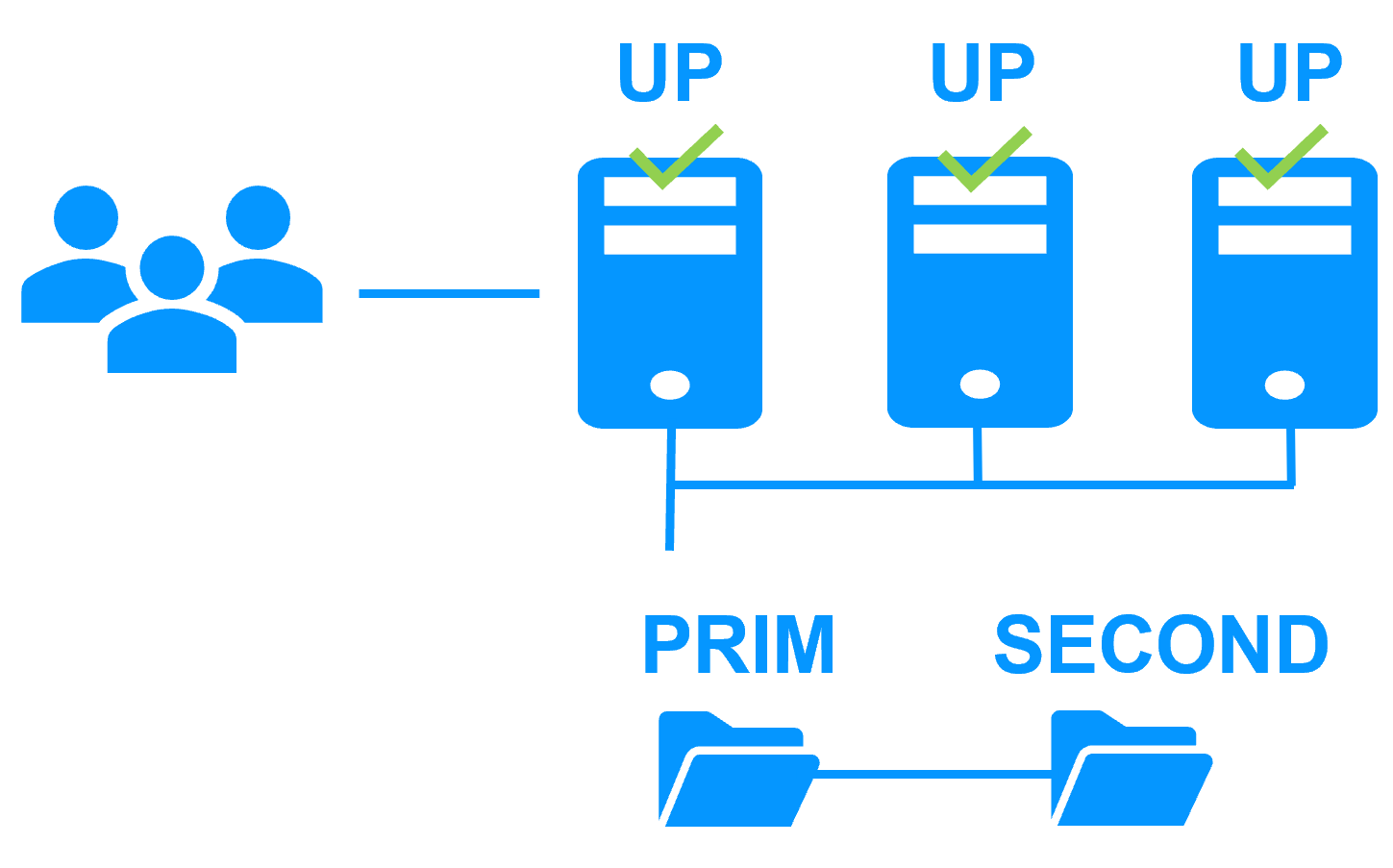
Virtual IP address in a farm cluster

How the Evidian SafeKit farm cluster implements Windows or Linux network load balancing and failover

On the previous figure, the Windows or Linux application is running on the 3 servers (3 is an example, it can be 2 or more). Users are connected to a virtual IP address.
The virtual IP address is configured locally on each server in the farm cluster.
The input traffic to the virtual IP address is received by all the servers and split among them by a network filter inside each server's kernel.
SafeKit detects hardware and software failures, reconfigures network filters in the event of a failure, and offers configurable application checkers and recovery scripts.

Load balancing in a network filter

The network load balancing algorithm inside the network filter is based on the identity of the client packets (client IP address, client TCP port). Depending on the identity of the client packet input, only one filter in a server accepts the packet; the other filters in other servers reject it.
Once a packet is accepted by the filter on a server, only the CPU and memory of this server are used by the Windows or Linux application that responds to the request of the client. The output messages are sent directly from the application server to the client.
If a server fails, the farm heartbeat protocol reconfigures the filters in the network load balancing cluster to re-balance the traffic on the remaining available servers.

Stateful or stateless applications

With a stateful Windows or Linux application, there is session affinity. The same client must be connected to the same server on multiple TCP sessions to retrieve its context on the server. In this case, the SafeKit load balancing rule is configured on the client IP address. Thus, the same client is always connected to the same server on multiple TCP sessions. And different clients are distributed across different servers in the farm.
With a stateless Windows or Linux application, there is no session affinity. The same client can be connected to different servers in the farm on multiple TCP sessions. There is no context stored locally on a server from one session to another. In this case, the SafeKit load balancing rule is configured on the TCP client session identity. This configuration is the one which is the best for distributing sessions between servers, but it requires a TCP service without session affinity.

SafeKit High Availability (HA) Solutions: Quick Installation Guides for Windows and Linux Clusters

This table presents the SafeKit High Availability (HA) solutions, categorized by application and operating environment (Databases, Web Servers, VMs, Cloud). Identify the specific pre‑configured .safe module (e.g., mirror.safe, farm.safe, and others) required for real‑time replication, load balancing, and automatic failover of critical business applications on Windows or Linux. Simplify your HA cluster setup with direct links to quick installation guides, each including a download link for the corresponding .safe module.

A SafeKit .safe module is essentially a pre‑configured High Availability (HA) template that defines how a specific application will be clustered and protected by the SafeKit software. In practice, it contains a configuration file (userconfig.xml) and restart scripts.

SafeKit High Availability (HA) Solutions: Quick Installation Guides (with downloadable .safe modules)
Application Category HA Scenario (High Availability) Technology / Product .safe Module Installation Guide
New Applications Real-Time Replication and Failover Windows mirror.safe View Guide: Windows Replication
New Applications Real-Time Replication and Failover Linux mirror.safe View Guide: Linux Replication
New Applications Network Load Balancing and Failover Windows farm.safe View Guide: Windows Load Balancing
New Applications Network Load Balancing and Failover Linux farm.safe View Guide: Linux Load Balancing
Databases Replication and Failover Microsoft SQL Server sqlserver.safe View Guide: SQL Server Cluster
Databases Replication and Failover PostgreSQL postgresql.safe View Guide: PostgreSQL Replication
Databases Replication and Failover MySQL mysql.safe View Guide: MySQL Cluster
Databases Replication and Failover Oracle oracle.safe View Guide: Oracle Failover Cluster
Databases Replication and Failover Firebird firebird.safe View Guide: Firebird HA
Web Servers Load Balancing and Failover Apache apache_farm.safe View Guide: Apache Load Balancing
Web Servers Load Balancing and Failover IIS iis_farm.safe View Guide: IIS Load Balancing
Web Servers Load Balancing and Failover NGINX farm.safe View Guide: NGINX Load Balancing
VMs and Containers Replication and Failover Hyper-V hyperv.safe View Guide: Hyper-V VM Replication
VMs and Containers Replication and Failover KVM kvm.safe View Guide: KVM VM Replication
VMs and Containers Replication and Failover Docker mirror.safe View Guide: Docker Container Failover
VMs and Containers Replication and Failover Podman mirror.safe View Guide: Podman Container Failover
VMs and Containers Replication and Failover Kubernetes K3S k3s.safe View Guide: Kubernetes K3S Replication
AWS Cloud Real-Time Replication and Failover AWS mirror.safe View Guide: AWS Replication Cluster
AWS Cloud Network Load Balancing and Failover AWS farm.safe View Guide: AWS Load Balancing Cluster
GCP Cloud Real-Time Replication and Failover GCP mirror.safe View Guide: GCP Replication Cluster
GCP Cloud Network Load Balancing and Failover GCP farm.safe View Guide: GCP Load Balancing Cluster
Azure Cloud Real-Time Replication and Failover Azure mirror.safe View Guide: Azure Replication Cluster
Azure Cloud Network Load Balancing and Failover Azure farm.safe View Guide: Azure Load Balancing Cluster
Physical Security / VMS Real-Time Replication and Failover Milestone XProtect milestone.safe View Guide: Milestone XProtect Failover
Physical Security / VMS Real-Time Replication and Failover Nedap AEOS nedap.safe View Guide: Nedap AEOS Failover
Physical Security / VMS Real-Time Replication and Failover Genetec (SQL Server) sqlserver.safe View Guide: Genetec SQL Failover
Physical Security / VMS Real-Time Replication and Failover Bosch AMS (Hyper-V) hyperv.safe View Guide: Bosch AMS Hyper-V Failover
Physical Security / VMS Real-Time Replication and Failover Bosch BIS (Hyper-V) hyperv.safe View Guide: Bosch BIS Hyper-V Failover
Physical Security / VMS Real-Time Replication and Failover Bosch BVMS (Hyper-V) hyperv.safe View Guide: Bosch BVMS Hyper-V Failover
Physical Security / VMS Real-Time Replication and Failover Hanwha Vision (Hyper-V) hyperv.safe View Guide: Hanwha Vision Hyper-V Failover
Physical Security / VMS Real-Time Replication and Failover Hanwha Wisenet (Hyper-V) hyperv.safe View Guide: Hanwha Wisenet Hyper-V Failover
Siemens Products Real-Time Replication and Failover Siemens Siveillance suite (Hyper-V) hyperv.safe View Guide: Siemens Siveillance HA
Siemens Products Real-Time Replication and Failover Siemens Desigo CC (Hyper-V) hyperv.safe View Guide: Siemens Desigo CC HA
Siemens Products Real-Time Replication and Failover Siemens Siveillance VMS SiveillanceVMS.safe View Guide: Siemens Siveillance VMS HA
Siemens Products Real-Time Replication and Failover Siemens SiPass (Hyper-V) hyperv.safe View Guide: Siemens SiPass HA
Siemens Products Real-Time Replication and Failover Siemens SIPORT (Hyper-V) hyperv.safe View Guide: Siemens SIPORT HA
Siemens Products Real-Time Replication and Failover Siemens SIMATIC PCS 7 (Hyper-V) hyperv.safe View Guide: SIMATIC PCS 7 HA
Siemens Products Real-Time Replication and Failover Siemens SIMATIC WinCC (Hyper-V) hyperv.safe View Guide: SIMATIC WinCC HA

Comparison of SafeKit with Traditional High Availability (HA) Clusters

How does SafeKit compare to traditional High Availability (HA) cluster solutions?

This comparison highlights the fundamental differences between SafeKit and traditional High Availability (HA) cluster solutions like Failover Clusters, Virtualization HA, and SQL Always-On. SafeKit is designed as a low-complexity, software-only solution for generic application redundancy, contrasting with the high complexity and specific storage requirements (shared storage, SAN) typical of traditional HA mechanisms.
Comparison of SafeKit with traditional High Availability (HA) clusters
Solutions Complexity Comments
Failover Cluster (Microsoft) High Specific Storage (shared storage, SAN)
Virtualization (VMware HA) High Specific Storage (shared storage, SAN, vSAN)
SQL Always-On (Microsoft) High Only SQL is redundant, requires SQL Enterprise Edition
Evidian SafeKit Low Simplest, generic and software-only. Unsuitable for large data replication.

SafeKit's Advantage in Application Redundancy

SafeKit achieves its low-complexity High Availability through a simple, software-based mirroring mechanism that eliminates the need for expensive, dedicated hardware like a SAN (Storage Area Network). This makes it a highly accessible solution for quickly implementing application redundancy without complex infrastructure changes.