eviden-logo

Evidian > Products > SafeKit: All-in-One SANless High Availability & Application Clustering Software > How a virtual IP address works in High Availability (Windows/Linux)?

How a Virtual IP Address Works in High Availability Clustering (Windows/Linux)?

Evidian SafeKit

Executive Summary: How Virtual IP (VIP) Ensures High Availability

  • Definition: A Virtual IP is a floating address that provides a single, persistent entry point for clients, automatically failing over between cluster nodes.
  • No Hardware Required: SafeKit manages the VIP at the software level using Gratuitous ARP (GARP), eliminating the need for external load balancers in same-subnet environments.
  • Application Transparency: By binding to a local VIP, applications remain unaware of failover events, preserving client source IPs and existing security configurations.
  • Disaster Recovery: Using an Extended LAN allows the same VIP to be used across remote datacenters, simplifying site-to-site failover compared to complex DNS rerouting.
  • Speed vs. DNS: Unlike DNS rerouting, which suffers from TTL caching delays, a VIP failover is near-instantaneous at the network layer.

A Virtual IP (VIP) address is a floating network address used in high availability clustering to ensure continuous application access. Unlike standard IPs, a VIP is not bound to a specific physical hardware interface but shifts between cluster nodes to maintain a single, persistent entry point for clients.

Virtual IP Implementation in Evidian SafeKit

  • Mirror Clusters: Features a floating IP active only on the primary server to facilitate real-time failover.
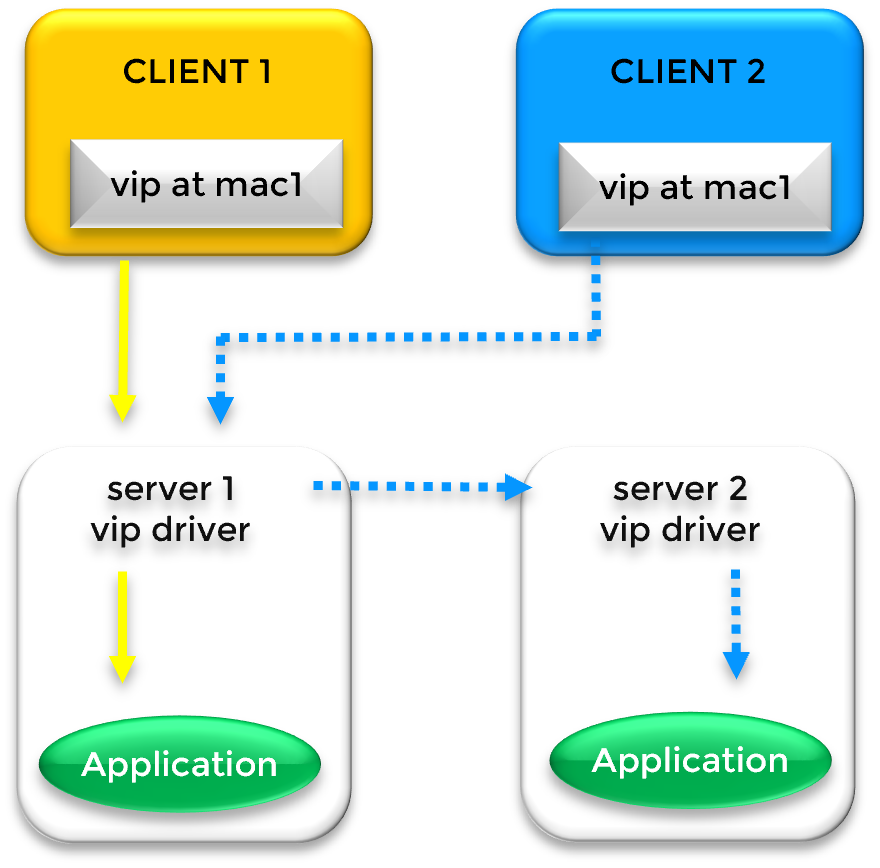
  • Farm Clusters: Enables network load balancing by maintaining the VIP across all nodes simultaneously.
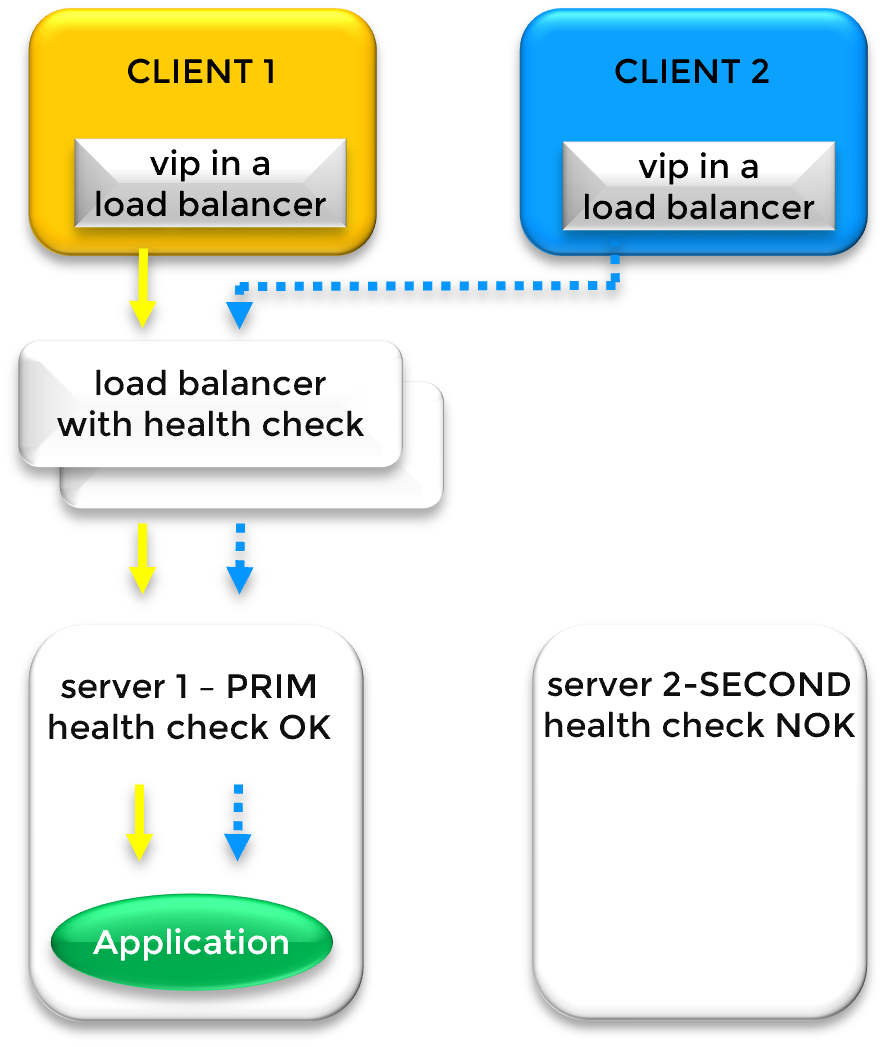
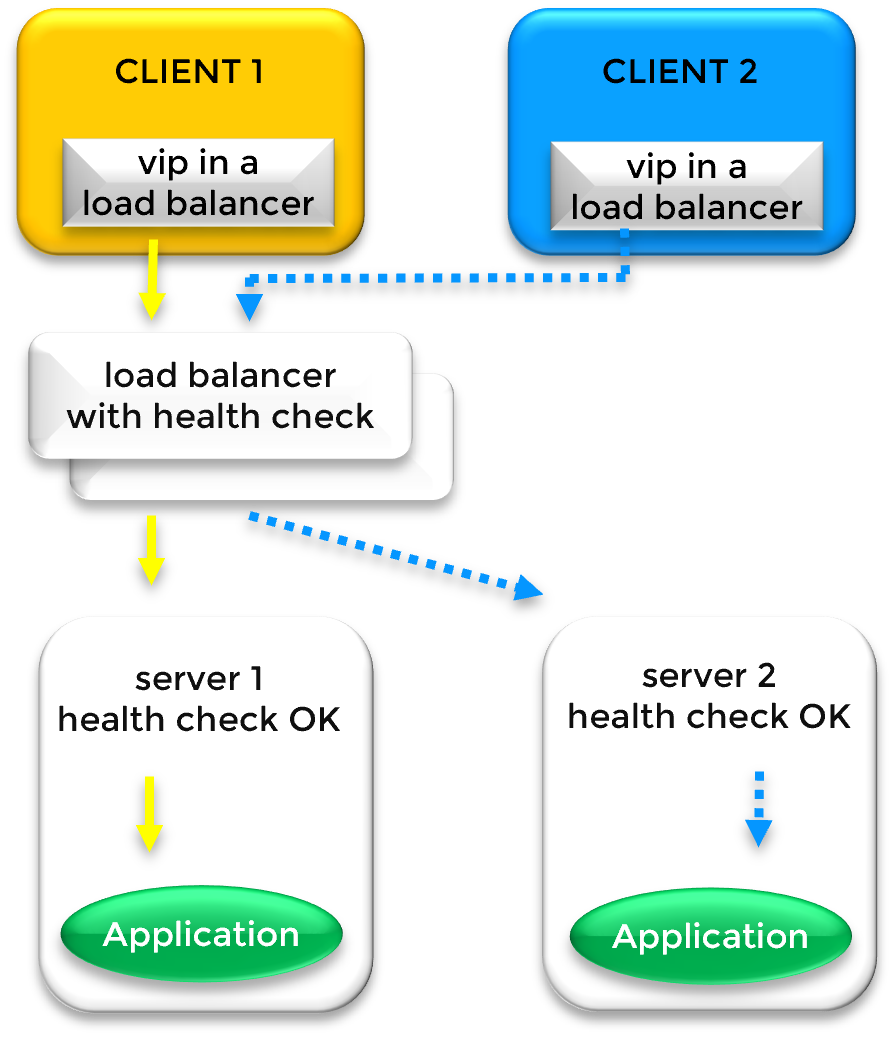
  • Cloud & Multi-Subnet: Managed via external load balancer health checks (AWS, Azure, GCP) to redirect traffic across different subnets.

Key Benefit: By utilizing Gratuitous ARP (Address Resolution Protocol) or MAC Address Takeover, the VIP allows for seamless application failover without manual client reconfiguration, ensuring 24/7 business continuity.

How a Virtual IP Address (VIP) Works in a Same-Subnet Failover (Mirror Cluster)

Automated Failover & Network Rerouting in a Local Subnet

For organizations requiring seamless business continuity within a local infrastructure, SafeKit Software-Defined High Availability for Local Network Clusters provides a robust, automated solution for managing Virtual IP addresses and real-time application failover.

Local Mirror Cluster: Seamless 2-Node Windows or Linux Failover

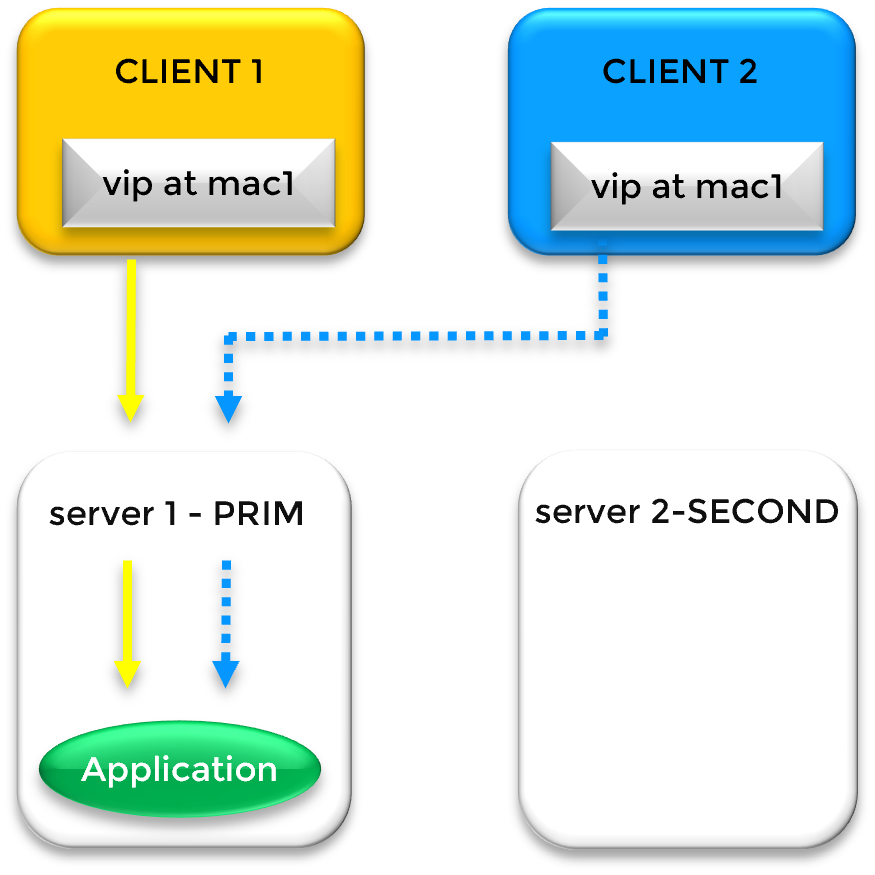
SafeKit Virtual IP (VIP) failover mechanism between two servers in the same subnet
SafeKit VIP Aliasing and MAC Address Mapping
In a standard SafeKit mirror cluster where both nodes reside in the same local subnet, high availability is achieved through a software-defined Virtual IP (VIP). Unlike hardware-based solutions, SafeKit manages this VIP directly within the OS networking stack. This VIP acts as a persistent logical entry point for clients, layered on top of the unique physical IP addresses of Server 1 and Server 2 via IP aliasing.

SafeKit’s Advanced IP Aliasing & Multiple VIP Support

A key advantage of the SafeKit solution is its flexibility in managing network identities. The VIP is a third IP address that "floats" between the nodes. Notably, SafeKit is capable of managing multiple virtual IP addresses within a single cluster. These can be assigned to the same primary Ethernet card or distributed across different physical cards, allowing for complex configurations where different services are bound to specific virtual identities.

The Failover Mechanism: Gratuitous ARP (GARP)

SafeKit ensures zero manual intervention during a hardware failure. Under normal operations, the VIP is mapped to Server 1's MAC address (mac1). If SafeKit detects a heartbeat failure on Server 1, it executes a two-step recovery:
  • Application Recovery: SafeKit automatically restarts the critical application services on Server 2.
  • Network Rerouting: SafeKit instantly broadcasts a Gratuitous ARP (GARP) message. This force-updates the ARP caches of all network switches and connected clients, remapping the VIP to Server 2's MAC address (mac2).

Remote Data Centers & Extended VLANs

While typically used for local clusters, SafeKit’s same-subnet algorithm is the preferred choice for Disaster Recovery (DR) across remote sites connected via an extended LAN or stretched VLAN. This "stretched" architecture allows you to maintain a single subnet across geographical distances, significantly simplifying your network topology and avoiding the overhead of complex routing protocols.
⚠️ Note: Layer 2 rerouting via Gratuitous ARP is the most transparent solution for applications. Unlike Layer 3 rerouting with a Load Balancer, it avoids Source/Destination IP Translation (SNAT/DNAT). The application receives traffic directly with the original client IP, and the Virtual IP is configured locally. Many applications prefer seeing the Virtual IP locally and receiving the original client IP directly. Without this transparency, they might not work as expected due to complex network translations.

Comparison: Virtual IP Implementation, Latency, and Application Transparency

Technical comparison of Virtual IP (VIP) redirection methods versus DNS rerouting for High Availability and Disaster Recovery.
Environment & Use Case High Availability Type Redirection Mechanism Network Latency Application Transparency & IP Locality
Primary/Backup (High Availability) Mirror Cluster Gratuitous ARP / MAC Takeover Very low: Time to detect and send broadcast GARP Full Transparency: Virtual IP is local on the active node. Client IP is preserved.
Load Balancing (Active/Active) Farm Cluster Kernel-Level Network Filter / GARP Very Low: Time to detect and reconfigure network filters Full Transparency: Virtual IP is local on all nodes. Client IP is preserved.
Same Subnet / Extended LAN (VLAN Stretching) Disaster Recovery (remote datacenters) Standard IP Aliasing / GARP Low: Depends on stretched VLAN RTT (Round Trip Time) Full Transparency: Virtual IP is local on the nodes. Client IP is preserved.
Different Subnets Disaster Recovery (remote datacenters / Cloud) External Load Balancer Moderate: Higher failover latency due to Load Balancer health check intervals ⚠️ Partial Transparency: Uses SNAT/DNAT. Virtual IP is NOT local on the nodes. Client IP is NOT preserved. Application must support it.
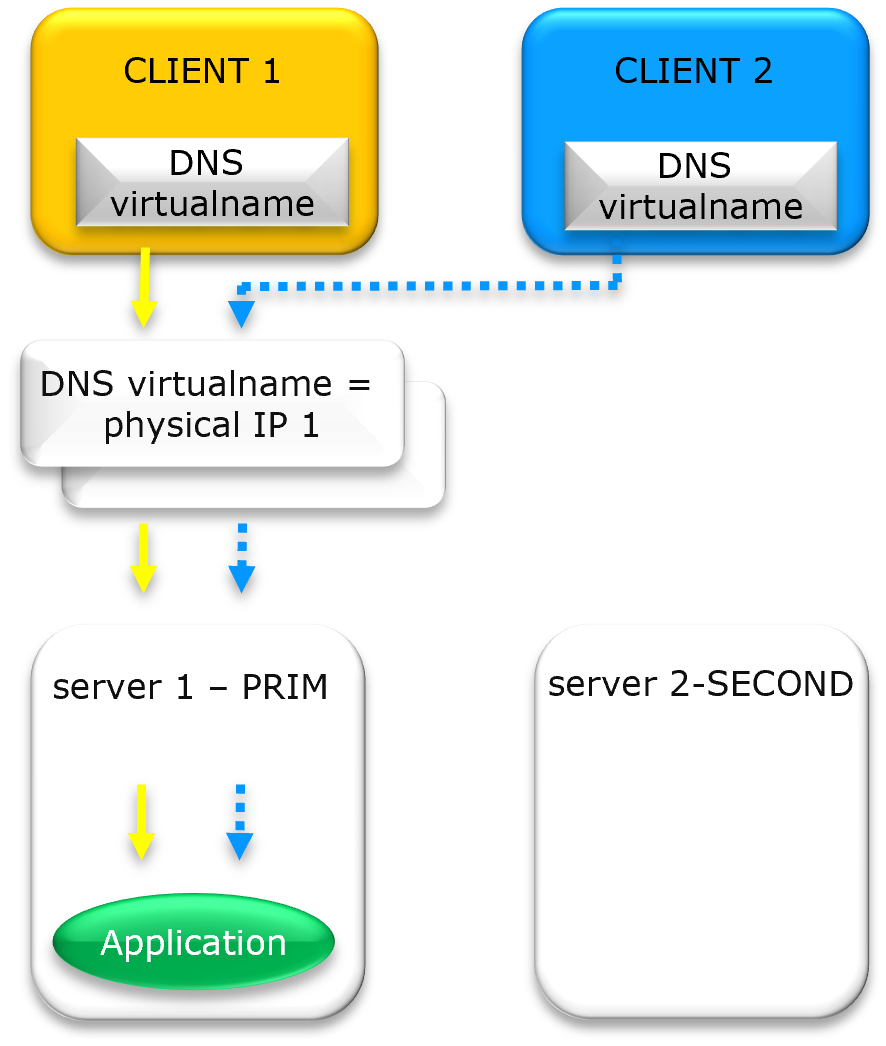
DNS rerouting: No VIP Disaster Recovery (remote datacenters) DNS Record Update (name / physical IP) High/Unpredictable: Dependent on DNS TTL (Time To Live) and Client DNS Caching. ⚠️ Unreliable: Client must re-resolve DNS. Most often, clients continue using the stale IP resolved at startup and are not rerouted after a failover.

Frequently Asked Questions on Virtual IP (VIP)

Virtual IP (VIP) & Networking

What is a Virtual IP (VIP) and how does it differ from a physical IP?

While a physical IP address is bound to a specific network interface, a Virtual IP (VIP) is a "floating" address independent of hardware. In a SafeKit cluster, the VIP acts as a persistent entry point; if the primary server fails, the VIP automatically migrates to a healthy secondary node, ensuring zero client reconfiguration.

Do I need a hardware load balancer to use a Virtual IP?

No. SafeKit High Availability software manages the Virtual IP at the software level. In same-subnet architectures, it utilizes IP aliasing and Gratuitous ARP (GARP) to redirect traffic. This eliminates the cost and complexity of external hardware load balancers or dedicated proxy servers.

What is Gratuitous ARP (GARP) and why is it used?

Gratuitous ARP (GARP) is a network broadcast that updates the ARP tables of network switches and routers. During a failover, the new primary server sends a GARP packet to announce that the Virtual IP is now mapped to its MAC address, forcing immediate traffic rerouting across the network fabric.

Can I associate a DNS name with a Virtual IP?

Yes. You can associate a DNS name with a VIP by creating a standard A record. The key benefit is that redirection is managed at the VIP level (via ARP or network redirection) and not at the DNS level. This ensures application transparency by avoiding delays associated with DNS propagation and TTL expiration.

Cloud & Advanced Architectures

How does a Virtual IP work in the Cloud (AWS, Azure, GCP)?

In cloud environments where Layer 2 (ARP) is restricted, SafeKit integrates with Cloud Load Balancers (AWS ELB, Azure LB, or Google GCLB). SafeKit provides a Health Check URL that the platform monitors to route traffic to the active node using SNAT/DNAT.

Is an Extended LAN better than a Load Balancer for Disaster Recovery?

Yes. For remote datacenters, an Extended LAN (stretched VLAN) is often superior because it maintains application transparency across sites. By keeping the same Virtual IP, the application and its clients continue to communicate using the same identity, making the transition between data centers completely seamless.

What are the limitations of DNS rerouting vs. Virtual IP?

DNS rerouting is limited by TTL (Time to Live) and client-side caching, which can delay recovery for hours. A major drawback is that clients which do not re-resolve their DNS name remain stuck attempting to connect to the failed server. In contrast, a Virtual IP provides instantaneous Layer 2 failover that reroutes all traffic immediately, ensuring connectivity regardless of client-side DNS cache status.

Transparency & Security

Why is a local Virtual IP important for application transparency?

A local Virtual IP (VIP) ensures application transparency by allowing the software to bind to a persistent VIP. SafeKit handles redirection at the kernel level, keeping the application unaware of cluster failovers, unlike DNAT solutions where the binded IP changes.

Does using a Virtual IP preserve the client's original IP address?

Yes. SafeKit avoids Source Network Address Translation (SNAT). Because the VIP is local to the active server, the application receives the original Client IP, which is critical for security auditing, session persistence, and regulatory logging.

🔍 SafeKit High Availability Navigation Hub

Explore SafeKit: Features, technical videos, documentation, and free trial
Resource Type Description Direct Link
Key Features Why Choose SafeKit for Simple and Cost-Effective High Availability? See Why Choose SafeKit for High Availability
Deployment Model All-in-One SANless HA: Shared-Nothing Software Clustering See SafeKit All-in-One SANless HA
Partners SafeKit: The Benchmark in High Availability for Partners See Why SafeKit Is the HA Benchmark for Partners
HA Strategies SafeKit: Infrastructure (VM) vs. Application-Level High Availability See SafeKit HA & Redundancy: VM vs. Application Level
Technical Specifications Technical Limitations for SafeKit Clustering See SafeKit High Availability Limitations
Proof of Concept SafeKit: High Availability Configuration & Failover Demos See SafeKit Failover Tutorials
Architecture How the SafeKit Mirror Cluster works (Real-Time Replication & Failover) See SafeKit Mirror Cluster: Real-Time Replication & Failover
Architecture How the SafeKit Farm Cluster works (Network Load Balancing & Failover) See SafeKit Farm Cluster: Network Load Balancing & Failover
Competitive Advantages Comparison: SafeKit vs. Traditional High Availability (HA) Clusters See SafeKit vs. Traditional HA Cluster Comparison
Technical Resources SafeKit High Availability: Documentation, Downloads & Trial See SafeKit HA Free Trial & Technical Documentation
Pre-configured Solutions SafeKit Application Module Library: Ready-to-Use HA Solutions See SafeKit High Availability Application Modules
FAQ Frequently Asked Questions on Architecture, Technical specs, Features See SafeKit HA FAQ